


 Using Web based Email such as Yahoo Mail or Google GMail is very convenient since it allows you to access your Email anywhere. But with convenience comes lack of functionality when compared to desktop based Email applications. One feature missing from Yahoo Mail is the use of creating templates or form letters for repetitive emailing. An easy way to get around this is to use the draft folders for storing templates or form letters.
Creating templates for form letters are mostly used when the body of the message is formatted with the same text, but you want to send them to individual recipients and have their name appear at the top of the message.
Start by creating the message and format it to your preference. If you will be addressing it, such as Dear Joe or Hello Jane, include it at the top of the message with out the recipient name. When finished click on the Save Draft button.
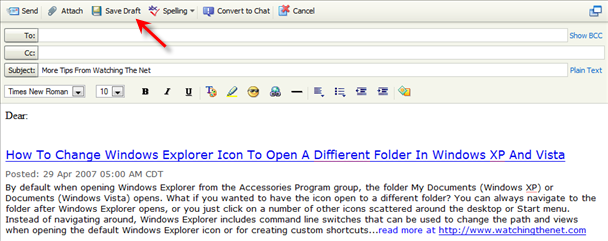
To start sending to individual recipients, Click on the Draft folder located in the left navigation menu bar, then open the form letter you just created. In the To: field just type the first letter of the person you want to send the Email, and a drop down list will appear listing all the names in your Contacts list that starts with that letter or click on To: and your Contacts list will open.
After selecting the name, don't forget to type the person name if you are addressing by Dear, Mr, Mrs, Hello, etc… then click send. The template message in the Draft folder will not change, and you can repeat sending using the steps above.
While this is not as convenient as using a desktop Email program, it does provide the needed functionality when you are accessing Email remotely.

Comments on Yahoo Mail Tip: Create Templates For Form Letters using The Draft Folder
Chuck @ 11:10 pm
Just to let you know that sometime in 2008, Yahoo changed the way the Drafts folder works, now it automatically saves drafts while you are composing them, if for some reason you have a problem before or while you are attempting to send the email and if you are lucky that it had recently auto-saved it, you can go into your drafts folder and you will find it there. I have tried to figure out a pattern to this auto-save feature but haven't been able to figure it out. Sometimes when I am composing a new message, replying or forwarding a message it will auto-save right away, some times it will repeatedly save approximately every 5 minutes and other times it will only save once or never. I kind of like that feature but I wish it would auto-save on a regular basis, however, there is also a big downside to this new feature, that I don't like. When you go to send it, it is suppose to automatically delete the auto-saved message, however, sometimes it doesn't and for people that used the drafts folder for templates as described in the article, it won't let you keep your own save as draft templates. Upon re-opening them, it immediately deletes in from from the drafts folder, if you send it, it's gone. If you attempt to trick it by opening a new browser window or tab when going to a draft and think it is still going to be there because you can still see it in the drafts folder shown in your original window or tab, you will find that if try to open it, you will get an error message from Yahoo saying the message was moved or deleted. If you attempt to wait until it auto-saves the message and then open the message in the another window, you will find that even though you can still see it on your screen in the window you originally opened the draft in, if you try to save or send it, it will again give you an error. I have bitched and complained to Yahoo about this new feature but the most I got back from them was an attempt to apologize saying that they made the changes based on feedback from the users. Personally, I don't think that is what it is, I think it was just their website programmers thought it was a "cool new feature" without really knowing how people use their Yahoo Mail accounts. I have seen many complaints about this on other websites, including Yahoo's own Yahoo Answers.
Why is it that they try to cram these "New and Improved features" down people's throats , when it would have been real easy to make them a feature that you could turn on and off in the Yahoo Mail Options section? Another thing I've suggested in their feedback section was to add a "Save to Template" button and of course a "Templates" folder but I never got a response back from them about it. It's like they don't care what people actually want and of course it's possible they didn't care because of the low moral at Yahoo since the announced downsizing at the company last year. By the way, I use Yahoo Mail Classic because I don't like the "New Yahoo Mail" interface.
Tk Agrawal @ 9:03 am
I totally agree with the last comment and believe that yahoo mail should allow a saving of the template
Jim @ 6:03 pm
I too totally agree with the last comment……..templates are such a useful tool that it is hard to understand their thinking.
Jim @ 6:54 pm
You can use the "Draft" folder to save a template. When you want to use the template just open it and make any changes or add attachments. Hold the "Shift" key when you hit "Send" and the original template will remain in the "Drafts" folder. Hope this helps…….it did for me
Diane Motmans @ 2:58 am
Hello, I've trying several times the the solution with the "shift" key, but in my case it does not help. Each time my modified message has been sent, the draft version disappears. Can somebody help?
Vicki @ 1:29 pm
Ugh….I spent hours creating and order template and saved to drafts folder. Once opened and sent….GONE….what the heck. Trying to make this easy for manager to place order and not have to use attachments. Guess I'll have to back up and punt. You would think YAHOO of all people would see the flaw in this a fix quickly, but I can see that this has been the case for quite some time, but I have just now tried this….wish I had known before I spent so much time on it. Am I wrong…did it not use to be this way? I very seldom use drafts, but I do remember in the past saving one, sending it, and it still remained in my drafts folder. Maybe not????
Gary @ 11:54 pm
Just throwing my hat in the ring. Yahoo needs to figure this simple thing out! Settings on/off for either direction if they would get too much kick back from users who use it the other way.
Sanchit Khurana @ 10:22 am
Save a Draft as suggested by the article and copy it every time in new compose ,This can be of a great help.