


 This week, Amazon launched the much anticipated public beta of it's AmazonMP3 online music store. The hype surrounding the launch wasn't about another music service, but a DRM (Digital Rights Management) free service.
With millions of titles available, and low pricing, Amazon is betting it's online store will be a bigger hit, than the popular Apple iTunes Store. Why, because the Digital Rights Management hassle is avoided and MP3 players that are not Apple Ipods, can now download their favorite tunes without realizing you can't convert it LEGALLY if you purchased from iTunes.
So how do you get started? With the AmazonMp3 download utility.
Once you have downloaded the tool, run setup by clicking on AmazonMP3Installer.exe and click Install to start the installation.
NOTE: Install instructions are for Windows OS's, but will be similar for Mac's.
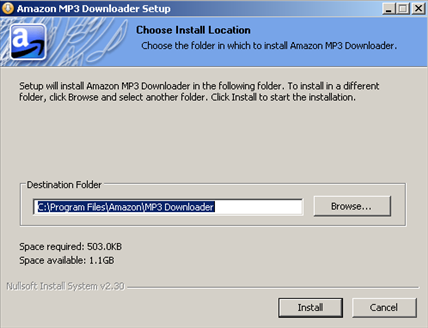
When finished, the installer will launch your browser informing you that the utility has been installed successfully.
To test MP3 downloads, AmazonMP3 store lets you download a free song (Energy by The Apples In Stereo) by clicking the Download Song button from the same page that informed you the install was successful.

After entering your information, you will see the Open dialog box. Make sure you check the box to "…automatically open files like this for now" and click OK.

Next, you will see the download progress.

When completed, your default music player will pop open and start playing (in my case, Windows Media Player). The song will be added to your play list automatically.

You can control which Media Library and directory songs should be added along with other configuration options in the Amazon MP3 download utility by selecting File \ Preferences from the menu.

A real nice feature with the utiltiy, if you are using iTunes, songs are added automatically added to your iTunes directory
Now all you need to do is go back to the AmazonMP3 site, download more tunes and enjoy free DRM music!

Comments on Installing MP3 Downloader For Accessing Amazon MP3 Music Store
Abdulmalik @ 11:33 am
thanks for sharing