


 Unlike Internet Explorer toolbar, Windows Explorer does not allow you to customize the toolbar to the point of adding shortcuts to folders, programs or icons for frequently used commands. But fortunately there is a way to simulate adding items to the toolbar, by using the Favorites menu in Windows Explorer. By using the Favorites folder, adding frequently accessed folders or executing commands will allow quick access with out the need to navigate through the file system.
A lot of people may get confused with Internet Explorer and Windows Explorer. Windows Explorer is the program used to navigate around your file system. When you click on a folder or a shortcut to a folder, Windows Explorer opens. Just like Internet Explorer, Windows Explorer also has a Favorite menu:
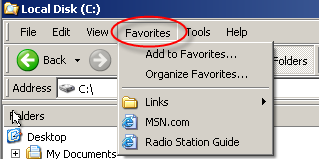
The Favorites folder is where you can add folders, programs or commands that can be quickly launched as if you added them to the toolbar area.
To get started, open the Favorites folder found in your user profile directory (C:\Documents and Settings\username\Favorites) or by clicking on Start \ Run… and type favorites in the run box and click OK.

Once you have opened the Favorites folder, clean up and delete any items you no longer need. When finished with clean up, navigate to any folder you want to add to Favorites, highlight the folder, and click on Favorites \ Add to Favorites… from the menu then click OK.
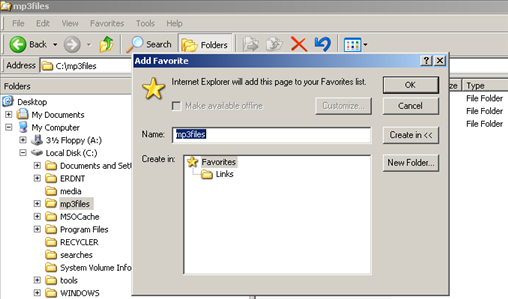
You can add the folder to the root of Favorites, or organize into separate folders.
As a System Administrator, I have a need to quickly execute commands, batch files or launch programs when I'm working in Windows Explorer. To do this, open the Favorites folder using the same method as above. Once in the Favorites folder, right click on a blank space and and select New.
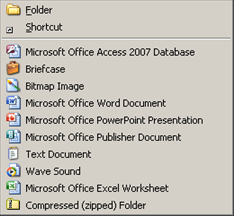
From here, select Shortcut and add any executables, programs or applications that you want to launch from the Favorites menu while using Windows Explorer.
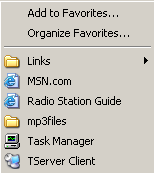
On my Windows XP Computer, I have added Task Manager and the Terminal Server Client.
Now when you using Windows Explorer, instead of using the Start menu or needing to minimize all Windows to show the Desktop, you can easily select Favorites from the menu and navigate or launch with ease.

Comments on Use XP Windows Explorer Favorites Menu To Add Folder Shortcuts And Commands
I am with Att, but am having problems getting a window off my screen. I'm also having problems getting my favorites folder back. Its so early in the morning, I'm going to wait till later to try to get somebody to help me. I don't know much about my computer. I'm afraid to do something to it.
Hi, I have been using Xp Pro on my deskstop although I have several Vista OS on other pcs (none working at present). I was told never to search the web when logged in with my Administrators Account so I created a second account sans password for convenience. I now see that I can uses soe programs with the limited account that I cant with my Administrator account. That its backwards is it not? I am talking about Lightroom by Adobe specifically, but I am not going to use it any longer sincne Adobe does not allow xp use of the newe version, BETA or v 4. Point here is actually,is it possibe to shahre Favorites Folder (one) amongst Administrator Account and Other Account? After all I am the same person? Otherwise can the ybe merged? Is it accurate that I should not be on the web with Admin account in case it i s compromised? How is it bete to use a non pw account? LOL
I am thinking I should dump the second account or just leave it there for emergencies, and just use the Administrator User Account because I do not want two or more Favorites Folderse, only one…I use them all the time and its too time consuming to go back and forth like this, very confusing also. Any suggestions? I wold like to merge them now if possible then follow your advice as to which user account I should log in and use online with. Thanks so much.