


 As all Windows users know, running Device Manager will give you an overview of all installed hardware on your System. Ubuntu also includes a Device Manager utility (located at System \ Preferences \ Hardware Information) which is very similar to Windows Device Manager.
One common feature missing in both Windows and Ubuntu Device Manager versions, is the capability to generate a summary report. Fortunately there is another tool available that provides greater detail of hardware information, with two added features: Summary and Benchmark reporting.
The utility, Hardinfo will gather information about your system's hardware and operating system, perform benchmarks, and generate printable reports either in HTML or plain text formats.
To install, open a Terminal window by clicking on Applications \ Accessories \ Terminal from the panel.
At the command prompt enter the following:
sudo apt-get install hardinfo
When prompted, enter your password. After installation has completed, click on Applications \ System Tools \ Hardinfo.
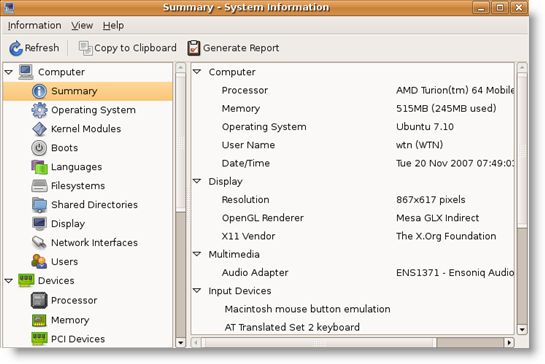
Right off the bat, Hardinfo provides a complete summary of your Ubuntu system and hardware setup.
Two main categories exist. Computer which provides high level system information such as Operating System, Kernel, Filesystems, Network Interface and Devices which gathers hardware device information such as Processor, Memory, USB and Storage.
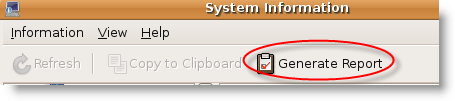
A feature missing in Device Manager is the capability to generate a report. Just click on the Generate Report icon in the toolbar…
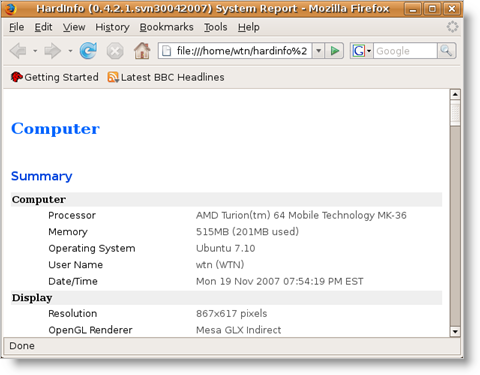
…and Firefox will open, displaying the report that you can save or print.
Hardinfo can also perform a benchmark of your System and compare it against Intel and Power PC systems.
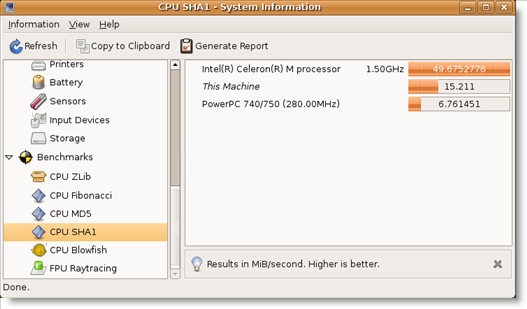
Six benchmark tests are available which includes CPU Zlib, Fibonacci, MD5, SHA1, Blowfish and FPU Raytracing. Unfortunately I could not run Zlib benchmark (it produced an error) and it appears to be a known bug with the utility.
Hardinfo is a great utility to add in your toolbox, that fills in the gaps where Device Manager misses, and provides a detailed System report (including benchmarks) that can be useful if you ever need to rebuild your System.

Comments on Ubuntu Guide For Windows Users: Display And Generate System Hardware Information
Duncan @ 6:35 pm
"Unfortunately I could not run Zlib benchmark (it produced an error) and it appears to be a known bug with the utility."
It's not a bug. Install the zlib development libraries (sudo apt-get install zlib1g-dev) and it will work correctly.
ujan @ 10:57 am
thanks for the info..
this is what i am looking for.. 😀
dwturner @ 11:23 pm
Installation didn't work for me. Ubuntu 8.10. Install seemed to go fine but nothing new in System Tools.
cdb @ 6:26 pm
Same as dwturner, installation didn't work for me. Ubuntu 8.10. Install seemed to go fine but nothing new in System Tools.
rectangle @ 4:56 am
With Ubuntu 8.10 I found it under System | Preferences | System Profiler and Benchmark
jazzyjeph @ 4:29 am
Nice tool, i'll 2nd rectangle's remark for the location of the shortcut in Ubuntu as well. However I didn't have anything listed under USB which was a shame as I was looking for my W800i that I had just connected 🙁
isa @ 3:38 am
Thanks for the fantastic app 🙂
I tried doing System>Preferences>Hardware Information and could not find it unfortunately… but this seems like all I ever really need.
Thank you once again.
Is it possible to find the original Hardware Information util as well?
fearmhor18 @ 8:51 am
Right click on your menu, click edit menu, go to system tools, click new item on the right.
For name put in Hardware Info, or whatever
For command put in " hardinfo "
And leave the description blank if you want.
This should add it to your list in the edit menu part and now jus tick it. Should do the trick?
david horner @ 11:44 am
I just installed 9.10. It didnt see the integrated net cad so i tried to find what it saw. Why does ubuntu assume it knows everything and the user need not be involved in hardware? Why are there options to change all kinds of software and features but nothing about the base hardware? Doesnt ubuntu have a way to show all hardware it sees out of the box? Every time I have read one of these help things it says go to xxxx/yyy/zzzz and run it. I have yet to find any of the 'options' people mention. Like hardware under system/pref/ . There is no hardware under system pref.
Why do you have to add software to add stuff to your machine? Why arent things in the menus like people in help say they are? Do this this and this and viola. Like not I have yet to find an original install have the menu options that people say they have.
david horner @ 12:29 pm
Tried but ap-get found nothing. where does it look? also why do you have to pull out your hair looking for lib this lib that . They never seem to work cause the version doesnt match. too new too old but won't work. They change weekly. Why cant programmers write code that just runs with everything needed built/compiled
in?
Prathamesh @ 5:05 am
I too was looking for a device manager for linux as i am new to Ubuntu 9.10 & have just flipped to Linux for good. I too feel that there has to be a native application shipped with Ubuntu to find out hardware information & mainly status.
Bill @ 9:10 pm
Thanks! Worked like a charm!
Jeff @ 2:57 pm
this was perfect. installed ubu maverick meerkat 10.10 and the harware lister is crap. wont do anything since lshw is owner permissions and i set up single user so no idea how i would get it to go. I installed this baby and no prob, got a full run first click, thanks for sharing it and the good install instructions
Jeff @ 3:04 pm
@david horner: I for one, remember how linux was when you had to code your own hardware at install time, and a slight typo my just total out your monitor for good, or even blow some condensors off your video card. Modems were just plain never working, you had to not only mount every drive, but had to code them in at install, aside from the fact you had to compile your linux kernal in the first place.
We have come a long ways from there, but all linux needs to stop watching what windows is doing so closely. all these security measures put in place are exactly why i tossed vista into the garbage can, for real. stayed back with xp til recently i just needed more change than window blinds had to offer. when your measures of security means you lock up the good people to protect them, well its just not much fun any more being protected.
Garry @ 9:49 am
Worked well. Great program. Thanks.
Johnny @ 3:54 pm
Just installed on Ubuntu 10.04 LTS. Work well. Exactly what I'm looking for.
Cheers!