


 For those of us who dual boot Windows Computers (and use Windows boot loader), know how annoying it can be to wait for the Operating System boot menu screen to finish counting down before proceeding to start up.
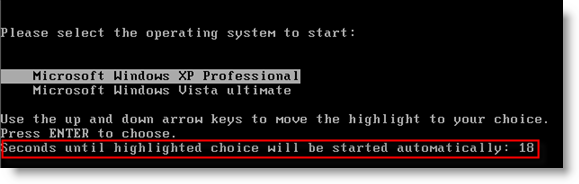
Sure, you can MANUALLY select the OS and buy pass the wait time…but it's just more convenient to let it automatically start up with out any intervention. To help with that convince, Windows allows you to decrease the time the boot menu displays, before proceeding with boot up.
Click on Start \ Run… (or press Windows key - Win+R) and type sysdm.cpl then click OK.
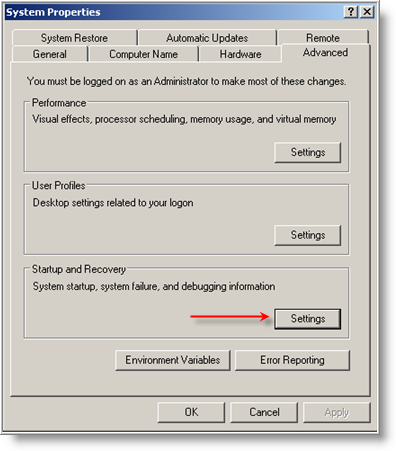
In System Properties window, click on the Advanced tab, then click on Settings button under Start up and Recovery.
NOTE: Screen shots are from XP, and will be similar for Vista.
In Startup and Recovery window, change the default time of 30 seconds for "Time to display list of operating systems:" to any time you want. For quicker boot times, set the time for about 10 seconds or less. Make sure you give yourself enough time, so you can make a selection when needed during boot ups.
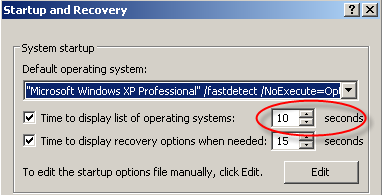
Now is also a good time to set the "Time to display recovery options when needed:" to some where around 15 seconds. This should give you plenty of time to make a selection when troubleshooting.
Additionally, you can change which Operating System is the default (for automatic booting) by pulling down the arrow and making a selection.

When you are finished making all of the above changes, click OK to save (then click OK to close System Properties Window).
Now that Windows will boot a little bit faster, you may need to run and get that cup of coffee!

Comments on Speed Up Windows Dual Boot Menu Startup Time
Awesome modification! Kudos.
Nice tip, thanks!
Thanks
I had forgot, because is not something you use it very often
Thans again
Thank You V ery Much!!!
tks
nice topic
Thanks buddy! It's really a great help!
Thank you, thats just i was looking for this morning
When someone writes an component of writing he/she keeps the idea of your user
in their/her mind that how the user can know it. Therefore that's why this post
is great. Thanks!