

 When setting up a Linksys wireless home network and using DHCP for assigning IP addresses to Computers, makes setup of all your devices easy and gets you online quickly.
While DHCP is convenient, devices such as printers should be assigned a fixed IP address manually to avoid conflicts on your wireless network.
Here's how you can setup a printer with a static address even if it has a wireless card, while still using DCHP on your Linksys wireless router for your home network.
By default on Linksys wireless routers, the DHCP IP address range is typically 192.168.1.100 thru 192.168.1.149 and addresses cannot end in 0, 1, or 255. Any fixed (static) IP address must be outside the DHCP server range.
This means that IP addresses you want to assign to devices, such as printers, need use an address in the range of 192.168.1.2 thru 192.168.1.99 or 192.168.1.150 thru 192.168.1.254 (assuming you are still using the default DHCP server range).
Let's assume you are still using the default DHCP address range and your router is also using the default IP address of 192.168.1.1. Your DHCP configuration will look similar to the following screenshot:
NOTE: menus and screen shots may be different from your Linksys Wireless Router depending on the model you have.
When configuring an address for the printer, the IP configuration would look like:
IP Address – 192.168.1.2
Subnet Mask – 255.255.255.0
Default Gateway – 192.168.1.1
It's important to note that even though you are not using any IP addresses in the default range for DHCP, the Subnet Mask and Default Gateway addresses will be the same. This configuration needs to be enter in the printer, not in the router (see the owners manual or vendor web site for steps on configuraing the printer TCP/IP information). By using the default DHCP range, there is no configuration needed on the Linksys router.
If you have another device on your network that will be assign a fixed address, you would use:
IP Address – 192.168.1.3
Subnet Mask – 255.255.255.0
Default Gateway – 192.168.1.1
For any other devices, just increment the IP address by one, 192.168.1.4, 192.168.1.5, etc and use the same Subnet Mask and Default Gateway.
Now if power goes out or you need to restart your Linksys wireless router, your printer will retain the fixed IP address instead of being assigned a different address than it previously had from DHCP .
Since you assigned a static IP address to your Printer, make sure your PC knows what the new IP address is.
First, see if you can print. If successful, there's nothing else that needs to be done. But if you can't print, you will need to update the printer IP address on your PC.
NOTE: Screen shots are from Windows 7, and should be similar for previous versions of Windows.
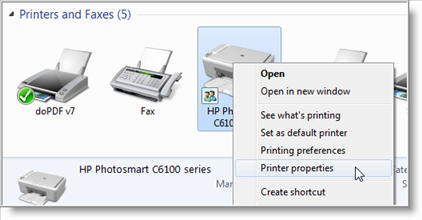
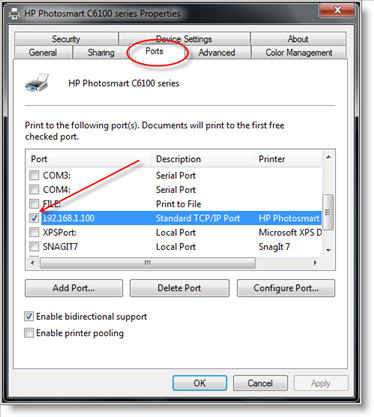
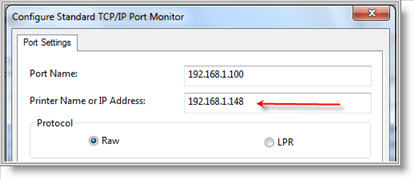
You should now be able to Print once again and never worry about any conflicts anymore.

The above information appears to be the answer to the problem I encountered when I installed a Ricoh Gx3000 printer to my home network via a linksys 4 port router. It worked fine,I believe,until I had to reboot the router. It reassigned an ip address to the printer.
Although I have not tested this theory, It makes sense. I knew I needed a way to assign a permanent address to the printer, but was not sure how to complete it. I found access to the web page for the printer but was not sure of what ip address to use. This article answers that question. I believe I will be okay now.
Thanks
MRob

I found this information very, very useful. I wanted my printer to have a static IP, while all the other components are dynamically assigned ips. I gave the printer an ip within the DHCP range…so you can imagine the issues (i.e conflicts when the printer is on and other components are turned on. The wireless router sometimes allocate the printer IP to one of the other components. Now I know that I must use an IP outside the DHCP range. Thanks alot.

Thanks for this tip. Because of problems with my router, requiring it to be frequently rebooted (hopefully resolved now, after enabling MTU size configuration and setting it), my printer was constantly being assigned a new IP addr, and I was constantly having to change the IP of the assigned port on my computers. This solved the problem.

Your tip was very close to my problem but not quiet.
My desktop is connected through Ethernet wire to Linksys WAG54GX2 router, my children connect to the Internet through the router, and we all share HP P2015 (printer is a USB but not a network printer). Every time any of us print a document we loose the router connection to the internet, and we do all sort of things to get it back some times we repair network connection, other times we reboot the router, etc. it has become a night mare to print and sometimes we delay our prints jobs to late at night.
Any suggestions are highly appreciated.
Zaki

Hi,
I would like to do the same thing to my home wireless network. However, we are using a Belkin router. Could you please direct me to the solution for the Belkin routers.
Thank you.

@Sudarshan
Your best bet is to start at Belkin's support page at –> http://www.belkin.com/support/
You may also want to see if Belkin has a support forum that you can post your question.

zaki,
your problem has nothing to do with this posting.
Zaki,
most definably a ID 10 T error you have there

Thank you very much for this info! This is exactly what I've been wanting to do with my print server. It is an old US robotics print server that comes with drivers that detect what IP was assigned to the print server by my router's DHCP. However, I installed 64-bit Windows on one of my machines, and alas, US Robotics no longer updates these drivers and they have no 64-bit compatible versions! Now, I just assign my print server a static IP and use a Generic IP port for the printer on my 64-bit machine!

If DHCP assigned an ip address to a system for say 48hrs and some one else assigned the same ip address to another system later statically, what will happen and if ip conflict how will you correct it as a network administrator.
@Ogunsakin Olatunji
With 2 systems assigned the same IP Address, a conflict will occur. Typically with MS computers if you tried to assign an IP address that is already on the network, an error message will appear warning you that the address is in use.
To resolve, you need to assign the computer (non-DHCP computer) an address out side the DHCP scope.
Korki,
Can please explain more? I don't know what you mean by "most definably a ID 10 T error you have there"
thanks
zaki

Thought this was very good and have setup my printer accordingly, however my home computer connect with the router does not recognise the static ip address of the printer. I check this with a ping on the address and get time out no response.
I also tried to just configure the printer port with the static ip address 192.168.1.2 This did not help. The printer has all the right parameters as described above. If you cannot ping it you cannot reach it.

Dlink routers beginning "many years" ago have a check mark on the DHCP table that enables the router to assign the same IP address to a device when ever the router is rebooted. This is a simple feature linksys should add to their their agreeably fantastic router range. I have seen many network printers that do not have feature for manual IP assignment. For those printers this workaround is useless.

well guys i have a problem related to this but its not exactly the printer, its the DVR (Digital Vdo Recorder)want to assign it a Fix Ip as I have to port forwarded that IP for DDNS. when ever the router is rebooted the IP is changed so i cannot Access my DVR and have to chage the IP in PORTFORWARDING options. any help will greatly be appreciated
i m using WAG200G Linksys
thanks

Hi
I am seeking for your help for HP printer 2100 IP addrss
At the moment i my printer
IP Address:0.0.0.0
Subnet Mask: 0.0.0.0
Default Gateway: 0.0.0.0
thtow the pritnter itself i can not get ip would you please mail me some guidence that how i can get ip for my network printer.
thanks for help

Good article. thnx.

Great information on static IPs, thanks. If I have a scanner/printer/copier on a company peer to peer and the scanner can't talk to the target PC, do you set the PC a staic IP also? I can set a static IP when doing the add a printer routine for TCP/IP. If I set a staic IP for the PC I want to scan to, will the other PCs be able to see it on the network? Thanks

Great job that filled in so many holes on Static IP with Linksys. Have a great day.

Problem solved! Thank you

Hi,
How about assigning a static IP address to my laptop? I have a static IP address to connect to my office server but everytime I connect to that static IP profile I couldn't get access to the internet. Currently i'm using the DHCP thing but I don't know to assign my static IP into it. Please help me! Thanks

I was having problems with a Samsung SCX-4826FN network printer, connected to a Linksys router by a network cable. It was continually resetting itself while plugged into the network.
I set the printer to Static Address 192.168.1.2 and it stopped resetting itself. Installing a new printer at this address made everything work. Thanks for the help.

I have linksys wireless configure with dhcp,I have server which had been installed windows xp
my question is that i want to give ip address the server.

I have a Lexmark X7675 printer that is attached to my network of wired and wireless units. All was working without issue. Yesterday, the wireless laptop could not print to the network printer. Even when wired to the network it still can not print to the network printer. Status "Offline".
Went to the Network Configuration for the printer, I removed the check at the "Obtain IP Address Automatically" and checked the "Obtain IP Address Manually".
After changing to the manual configuration, the last section of the IP address was changed to 3 also changed to 150 to 155 to 200. The constant response after every attempt to make a change outside the 100 to 149 range is the same which is "The specified IP Address is not valid."
What is the fix?
HELP indicated that a different subnet be used. How do you do that?

So glad to find this tip! What a simple solution, once you know it!

Good job think this site is a great asset to the internet community. Keep up the good work. Its nice to have a refresher on certain things forgotten and this site helps a lot. Thumbs up!
~Mysterious Bystander~

Follow these steps to set up your printer on each (XP) machine:

I have a non-wireless printer connected to the USB port of a linkage e4200 router. Currently only 1computer has access.
Does anyone know of a to configure the router so other computers have access without the 1computer up and running?

Hey friends,i have ptcl modem as for main router and 2nd im useing wag200g linksys router2+ for wireless access.for ptcl config 192.168.1.1 so i put for linksys wag200g 192.168.1.2.but still error,ip address is conflicting.what should i do?

Great Post. Thanks. I was able to fix IP address for my Samsung CLP-325 on DLink DIR 615. For those who need it:
1. Login to router, Setup Network Settings
2. Check DHCP server settings – ususally selected DHCP server with IP range between 100 and 199 and a lease of 1440
3. Select IP address outside the range selected 192.168.0.20 in my case ,
Note:Seems to be working after a reboot. There is also that you can use reserve DHCP but then the IP address has to be within range, the 20 falls outside it,
4. Now in windows assuming that you had installed the drivers select printer and right click for Printer properties, configure port and enter the IP address and do this for all the machines
5. If this does not work see the note above and go that route

Thanks for sharing. Helped in setting up my printer with a fixed ip 🙂

This information is very helpful. However, I still don't understand… if my printer is setup to be DHCP and so is my router, why can't the network keep track of where the printer is? I can see that the router assigns IP addresses just as expected after turning off/on networked computers. I have a Samsung CLP-325W with a Linksys router.
Having said that, it seems the problem is not with the router or the wireless printer – the problem is with the MS "Configure Standard TCP/IP Port Monitor" form. This form asks for a fixed IP address with total disregard to activating DHCP.
Start -> Printers and Faxes -> File -> Server Properties -> Ports -> click printer port -> Configure Port… -> get "Configure Standard TCP/IP Port Monitor" form.
In the form, you are required to put in the printer IP address. When DHCP renews IP addresses, this dumb form does not get updated and so the network cannot find the printer.
Thanks for any clarification.

Great article! So does that mean that if I have a NAS and I wana set a static IP for port forwarding so that I could access it remotely. Do I apply the same theory too?

each time i used to read smaller content which also clear their motive, and that is also
happening with this article which I am reading at this place.
My range is DHCP Server Setting is 192.168.0.2 to 192.168.0.254. The network wireless printer connected to the Router is 192.168.0.8. The LAN IP Setting is 192.168.0.1.
So to what do I change the IP setting for the printer when I check OFF for DHCP?
Log into your Router and go to the Network settings (usually under Set-up). Check the DHCP range that is normally 192.168.0.2 to 192.168.0.199. Anything greater than 199 is considered static. If as you say the full range is DHCP, you can change the range to stop at .199. I usually just use .205 because it's easy to remember. You do not have to turn DHCP off normally, that way people can connect their laptop wirelessly to your router if desired with only a password, you would not have to assign them a IP address and then have to set that up on their laptop.
Thank you for the replay but I was about to make the change for the DHCP to end at your suggested 192.168.0.199, but did not. Would this change make my range for DHCP from .200 to .199?
This does not seem to be correct regarding the range for the DHCP. If I used the .205 then the range would be from .200 to .205?
I am confused regarding these ranges that seem to have the DHCP very limited and what address do I set the printer since the LAN IP Setting is still at 192.168.0.1
Here is a picture of what I have without the wireless computers online and a desktop that is also not online:
Netgear @ 192.168.0.3; Printer @ 192.168.0.8; Netgear extender @ 192.168.0.9; Cellphone connected WiFi @ 192.168.0.11, and Main Desktop computer @ 192.168.0.13 as reported by Advanced IP Scanner when set to 192.168.0.2 – 192.168..0.254
192.168.0.2 is actually 192.168.0.002, not .200.
So if you make your range 192.168.0.2 to 192.168.0.199 that will be the DHCP range.
Anything above that would then be static and would not change if you reset your router.
Thank you again, but if my 192.168.0.2 is really .002, how do I set the printer to .3?
Setting the printer to .3 would that also be .003 or do I use .300?
Not sure why you are wanting to set your printer to that, you can't go higher than .249 anyway. Set your printer to 192.168.0.205 as I suggested before and it will be static and all will be good. You of course will need to do that at the control panel of the printer or through it's web interface. Then when you go to add a printer you will need to set it for TCP/IP and enter the IP address.
Of course we are talking about a network printer with a CAT5 or 6 cable. If it is a USB printer you can't do this that I know of.
The printer is connected to the router and used by the wired desktop units and is a wireless to the laptops. This printer is connected with a CAT5.
Made the change on the printer to end with .205 and removed the DHCP check ON in the printer settings.
No problem printing for either the wired or wireless units.
Sorry to be a bother but I was trying to understand how this works and what to do if it does not.
All is fine at the moment and I thank you for your help
Glad to be of help!

Your solution does not address the issue, of correct use of static ip assignment on the dns server. I want to assign the ip address and "device-name" in the dns server and refer to the device by "name". I should not have to manually refer to the device by its ip address. That negates and breaks the purpose for having a truly correct dns server in the router.

aw frig! When I click "Configure Port" I get an error message stating "This operation is not supported."
What does that mean, anyway?!?

i have a linksys router…with the
default gateway of 192.168.1.1
subnet mask =255.255.255.0
and the ISP assigned me a static ip with the subnet mask of 255.255.255.192 ,and if i am not wrong then it means that i can assign ip to 62 host ???
so if i want to assign static ip to some of my computers from the ips given from ISP and want to config some with dhcp..THEN WHAT SHOULD I DO?
I tried to manually assign an ip to my laptop from the range of isp ip…but after that it didnt connect to internet..then id had to assign an ip from the dhcp to get internet connectivity.
so can anyone tell me that where i am wrong?

Thank you for every other wonderful article. The place else could anybody get that kind of information in such a perfect approach of writing? I've a presentation next week, and I am on the look for such info.

Like many other people I need to install a static IP address to fix our HP Officejet Pro 8500, which refuses to print unless you turn off/on repeatedly every time you queue a document.
However, when I try to install a static IP on my laptop (windows 7) I get the message THIS OPERATION IS NOT SUPPORTED. I don't understand why? I am the owner-administrator and all priveleges are set / assigned to me. Is there some other way to get around this message and install a static IP? Please help. thanks, PJB

connection printer use in another printer through network.while restart goes offline.give solution

I was unable to complete the operation, hoping to change the apparent status of printer being offline, but could not progress beyond he Ports tab as clicking on Configure Port threw up message that this operation was not supported.

Perfect.
We had problems with our Envy 5540 saying it was offline when it wasn't and being unable to print.
Now totally fixed.
Many thanks
You can also create a new port/ip rather than change the old one.
From the ports tab
Click add port
Choose standard tcp/ip
Add the ip you want (eg 192.168.1.204) the name can be the same.
Click next until done.

Hi I'm using a HP P2010n printer for sharing in a class room , printer is secondhand one and got a static ip ( which is different from my pc s ip). what is the best way to assign new static ip to printer and share it with other computers. Your kind advise greatly appreciate..!!

Oct. 14/18: I'm using a Windows 10 laptop and the HP OfficeJet 4650 printer. I tried using your directions but could not configure a network port (kept getting the same error message as everyone else above). Nor could I add a TC/IP port. Finally, I went into Settings, deleted my printer, and then added it again after connecting with a USB cable. Upon clicking Manage device I was able to add a new port and configure it. Success!!!! Thanks for your instructions as at least I knew how to begin.

This is too complicate for me. U bought a printer to print. Not to take a programming course.

It worked and allowed me to set it up on my VM Hub 3.0. I have yet to see if it retains the IP Address but it is looking promising.
Thank You, Bernard Ashton
Configured my VM Hub3.0 for this and it picked up the printer. Have yet to see if the printer retains its IP Address but it is looking Promising. Thank You, Bernard Ashton
Stuart Hodgson, It is all like this now sorry!

I attempted this procedure and was messaged that "Operation is not supported". Ive been having same issue with printing on all devices: 2 laptops and cellphone. Sometimes it spontaneously starts working one week and does not the next.


Leave a Reply