


 Windows provides several methods to view processes remotely on another computer. Terminal Server is one way or you can use the command line utility pslist from Microsoft Sysinternals site. While both options are good alternatives, Windows XP and Vista provides a built in utility for viewing and killing process on remote Computers using Tasklist and Taskkill commands.
Both tasklist.exe and taskkill,exe can be found in %SYSTEMROOT%\System32 (typically C:\Windows\System32) directory.
To view processes on a remote Computer in your home, you will need to know the username and password on the Computer you want to view the processes. Once you have the user account information, the syntax for using tasklist follows:
tasklist.exe /S SYSTEM /U USERNAME /P PASSWORD
(To view all tasklist options, type tasklist /? at the command prompt)
To execute, click on Start \ Run… and in the run window type cmd to open a command prompt. Then type the tasklist command, substituting SYSTEM for the remote computer you want to view processes, USERNAME and PASSWORD with an account/password on the remote Computer.
(NOTE: if you are in a Domain environment and have Administrator rights to the remote Computer, you will may not need to specify a Username and Password)
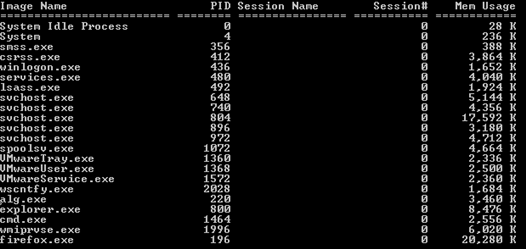
Now if there was a process that needed to be killed, you can use the taskill command. As with tasklist, you will also need the Username and Passoword on the remote Computer. The syntax for using taskkill is
taskkill.exe/S SYSTEM /U USERNAME /P PASSWORD /IM PROCESS
(To view all taskkill options, type tasklll /? at the command prompt)
Where SYSTEM, USERNAME, PASSWORD is the same as above for the tasklist command, and IM is the process image name you want to kill. In the above screen shot we will kill firefox.exe by typing the following at the command prompt:
taskkill.exe /S wtn1 /U joe /P ddd1234 /IM firefox.exe
SUCCESS: The process "firefox.exe" with PID 196 has been terminated
You can also kill a process using the PID (Process ID) of the process. In the above example the PID for firefox.exe is 196:
taskkill.exe /S wtn1 /U joe /P ddd1234 /PID 196
If the process does not terminate, you can use /F to forcefully terminate the process.
taskkill.exe /S wtn1 /U joe /P ddd1234 /PID 196 /F

Comments on How To View and Kill Processes On Remote Windows Computers
thanks for this tip. However, I have tried both listing and killing a process on a computer on the network without success. It returns the message, "The RPC Server is unavailable". I typed tasklist.exe /S computername /U username /P password.
Please let me know whwer i am wrong.
@Boniface
More than likely the ports are being blocked by a firewall or a policy is in place preventing remote management of the computer you are trying to reach.
I can do this however when i type in the domain and password it connects and then requests a password again even though the aaccount I am trying to access has no password.
Why is this?
Without turning off the built-in firewall, how (which TCP&UDP ports) do you open it to allow the remote access. I have fiddled with this to death and cant figure it out. If we turn off Windows Firewall - it WORKS, but when on, no matter what normal RPC/DCOM ports we try, it just wont work (135-139, 445, 1035, 1900, etc)
Getting very frustrated!!!
@jman_va
Running "netstat -an" (no quotes) shows ports 135, 139 & 4371 (TCP/UDP).
If it still does not work for you, you may want to run a sniffer (Wireshark) and see if other ports are needed.
If you have security concerns with opening up too many ports, your best bet is use the RDP protocol (TCP port 3389) instead of tasklist & taskkill for management of Windows desktops.
Is there any restrinction with XP SP2?? I get an error message:
'TASKLIST is not recognized as an internal or external command, operable program or batch file'
I checked the System32 folder and I do not have any of the files.
@Vianick
If you have Windows XP Home, tasklist.exe is not included (it is with XP Professional).
Instead, download it from this link.
Thanks, that was really usefull. Would it be a lot to ask if you have the taskkill too?? Thanks
@Vianick
Not at all. Try this link.
Thank you big time, I managed to view the process using tasklist /u Ip /username /Pword.
But I can not kill the processes using(/IM process or /PID pid) I do not know what's up. Help plz!
I'm using XP pro. accessing MS Server 2003 remotely.
Regads
LS
@lulu
What is the error message you receive when trying to kill process?
Also, make sure you have Administration rights on the system you are trying to kill processes.
usually you get RPC server unavailable because the computers local security policies dont allow you to connect to the PC… if you have XP PRO [i havnt used any other OS with remote process list /kills or remote shutdown] you need to go to control panel>Administritive tools>local security policy>local policies>find network accesss sharing and security blah blah, double click and change from guests only to classic-users identify themselves… this should work, change this option on both PC's, other than this i cant help you
this problem may back to your windows firewall if you using XP sp2. check this link support.moonpoint.com/os/windows/xp/firewall/rpc-server-unavailable
For Vista, tick the following exception in the firewall :
Windows Management Instrumentation (WMI)
Thanks!
Thaks alot!! it works.
I've tried several types of login:
tasklist /s kenyer /u abydos /p *******
tasklist /s kenyer /u KENYER\abydos /p *******
tasklist /s kenyer /u abydos -> asking for pw: i type it
but always get the message that wrong username or password…
Any idea? (i can log in with remote desktop)
@abydos
Is system you are trying to connect, part of a domain or workgroup? If so, you may need to prefix the user name with the domain or workgroup.
For example if the domain name or workgroup is ABCD:
/u ABCD\username
Or if the account is local to the system, prefix it with the remote computer name:
/u computername\username
Also, make sure the account you are using has the necessary rights to kill processes on the remote system..
very useful! i've make a copy in my blog , hope u don't mind.
Hi There, is there a way to find out what %age of the processor is being used by what process?
Thanks
Rob
THANK YOU FRO THE INFO…
BUT IS THERE ANY WAY TO DO THIS WITHOUT CHANGING THE FIREWALL SETTINGS FOR THE REMOTE MACHINE
@ARUN
If the ports on the firewall of the remote machine are not open, than you can't use the above commands. Otherwise you need to use another method or physically access the machine.
Thanks. This info really helped me with getting rid of the virus called Symantec at my office. Works like a charm!
Trying to kill a process using taskkill but getting the following, although I use the /F option.
Any ideas?
Thanks
C:\>taskkill /s gbrpwmw0329094 /f /PID 784
ERROR: The process with PID 784 could not be terminated.
Reason: This is critical system process. Utility cannot end this process.
@Constantin
More than likely you will not be able to kill a system process.
@Watching The Net
i have the invalid user or password error aswell
have xp home on 1 pc, xp pro on the other
downloaded the tasklist & taskkill from here for my xp home pc
I have also tried ur tip:
For example if the domain name or workgroup is ABCD:
/u ABCD\username
Or if the account is local to the system, prefix it with the remote computer name:
/u computername\username
Also, make sure the account you are using has the necessary rights to kill processes on the remote system..
still i got the invalid user/password error
any suggestions? 🙁
when I try run netstat to check connections i see the bios screen blink up then it dissapears whats the crack there and can someone help please
@Scott:
Are you running from a command line? It sounds to me like you are running that command straight from the >start>run box.
Make sure you launch the command prompt first and then run netstat -an to get the port listing.
@Jim: thank u Jim thats exactly what i was doin duh me lol thanks a lot
Thanks this was a really great article. it saved us going to the remote server and doing a hard (ugly) reboot. Thank you so much
its just amazing and very helpfull……thanks…….
I'm desperately trying to get tasklist /s to work
it will only work for the local computer - any remote computers (eg: laptop) it just hangs forever
I realise I need to set the remote computer/s to allow some sort of access (they are on the "WORKGROUP" network and I can access files etc) - but I just can't find this information anywhere
all computers running XP sp2
please help………………
many thanks
Mick
@Mick
"…any remote computers (eg: laptop) it just hangs forever" - do you have a firewall or router that may be blocking the typical netbios ports tasklist uses to communicate to the remote computers?
Hi there
sorry "the typical netbios ports tasklist uses to communicate to the remote computers?" is a bit above my head -
……but I HAVE found I can get it to work by disabling the firewall on the laptop AND assigning a password to the laptop user name - neither of which are things I really want to do
even then it asks for the password to the local computer's user name
I just wanted to have a quick batch file to kill a program on the laptop to save me walking through the house - but now walking through the house seems a fantastically easy option - oooh I love Windows!!!
Mick
@Mick
It's not Windows, but your lack of understanding with how computers works, is the reason why you are having problems. To be honest with you, what you have done is comprised security to make tasklist work by disabling the firewall
Also, the fact that you had to "assign" a password to the user account (which indicates no password existed in the first place) is probably another reason why you should not go around killing processes in the first place.
Ports are how computers communicate with each other (see Wikipedia definition) and has nothing to do with it just being a Windows operating system.
Well thanks - that's very helpful
I didn't say that I LEFT the Firewall switched off - but as a previous correspondent it was the only way I could get it to work - nobody yet has suggested another way to get it to work -
Also I am not in an office situation so do not need or want unecessary passwords
anyway with your attitude you shouldn't be pretending to help people
Bye
@Mick
Sorry you took my comments the wrong way. But if you can't take constructive criticism, especially when security is being compromised (regardless if it's at home or work)…then adios.
I have one question.. how about if I want to attach the proces from remoted pc to software like cheat engine for hacking game.
if u don't mind please answer it to my email.
thanks.
Hi, this works for one remote computer but i want to run it on a whole load of them, how would i script this? you help is really appreciated.
thanks
@Tim:
Ticking WMI worked for me on Win 7 Pro.
Thanks, Tim!
@colin:
i dont know actually get your mean .
u can simply use the bath files command
tasklist /S pc1 /U user1 /P password1
tasklist /S pc2 /U user2 /P password2
.
.
.
also you can windows api Shellexec in any programming language. if your network have a same user password or user and passwords stored in database or text file then the remote commands can be generated automatically
vbScript
open=ShellExec "taskkill /s "+IPString+" /u samesuer /p samepass /im sameproc"
Does anyone know how I can see what the full command line is of the remote processes?
Thanks
Well i think this is a great little helper file.
Its really useful for removing viruses that stop any programs running that will allow you to remove them.
Thank you.
Worked ok for me and saved me a lot of time. Thanks.
Thanks, It worked for me
Had trouble getting this enabled on a Win 7 machine. Finally did the following: opened PowerShell as Administrator, and used the following command: Enable-PSRemoting
Fixed all firewall and services issues.
from my server y can kill remote process from all of the lan pcs. i cannot get inside of two of them. they have win2kpro. any suggestion?
I tried it at my college but i didn't succeed please let me know any other wat to get this
thank u———vamsi
i try with
C:\Documents and Settings\great1>tasklist /s ashok /u great
Type the password for great:****
ERROR: Logon failure: unknown user name or bad password.
what is wrong i have made…
???????????????
@rod:
if you have fire wall ?
check port 445
check your system configure
sir i have turn off the firewall on both pc's(remote and local)…
i m using windows xp professional sp2…
i have configured the remote desktop and it is working but tasklist is not working…
what else i need to be configured..?
@killer:
it back to your user name and password .
your user (great) must be registered in "ashok" system
@ashok:
it back to your user name and password .
your user (great) must be registered in "ashok" system
yes, i m using the same username(great)
and password to login into the computer(named ashok).
I couldn't find an answer for my RPC woes in Windows 7. So I had a look in the Windows Firewall and saw these guys:
Remote Administration (RPC) rule
I flipped on the one with the Domain profile (since I'm connected via VPN so I'm on the domain) and this solved my problems.
can u use this in creating a client server??
am i trying to create a client server program using vb can anyone help me..
@steven:
this commands are server and client that has created before ,
if you want use this commands in side of your application one way is using api like shellexec.
in other hand ,if you want create new client server u must use the winsocket to comunication between client and server. this is out of our discussion.
Thanks very much. These commands allowed me to remotely view and kill a malware process that had disabled task manager and regedit on the local infected machine. Can't thank you enough!
@John:
Windows can throw a tantrum if an account doesn't have a password. I would suggest setting one and seeing if that helps. (I know the comment is 4 years old, but it might help someone)
Beautiful outlined the purpose of this forum topic. Helpful - done my job as an Engineer, and I'm good to go. Thanks "Watching The Net".
Very good article. By using remote support tools such as logmein, gosupportnow, GoToMyPC, RHUB appliances etc. one can kill Processes on Remote Windows Computers.
@Kevin peterson:
the main advantage of taskkill and tasklist is the distributing by ms windows
is there anyway to pass the currently credentials?
So if user runs script it runs under that users credentials so you don't have to put in credentials?
Although not meant for monitoring remote Windows PCs, but if anyone is interested in monitoring Windows Embedded Compact devices (or WinCE devices) from their PC remotely, the Remote Task Monitor is a good option.
http://www.remotetaskmonitor.com/
The thing I found helpful was being able to remotely restart the device, and get CPU usage alerts and emails when certain CPU threshold or peak is reached.
It is not free, but does the job for us well.
@John:Null passwords are not accepted. The remote system has to have a password
nice thank you for this great work,
Besides using "tasklist" there are few other ways to get list of remote processes: WMI query, wmic tool and PowerShell script.
With PowerShell it becomes really powerful: you can query multiple computers at the same time, filter and sort by processes name.
For example, query computers in an AD domain for list of running processes:
Get-ADComputer -Filter {OperatingSystem -Like “Windows 10*â€} | ForEach-Object {Get-WmiObject -Class Win32_Process -Computer $_.Name}
Here is detailed description of the syntax: https://www.action1.com/kb/list_of_running_processes_on_remote_computer.html
Also if you need to get a list of running processes on domain computers run WMI query in ROOT\CIMV2 namespace:
- Start WMI Explorer or any other tool which can run WMI queries.
- Run WMI query: SELECT * FROM Win32_Process..
Full guide read here https://www.action1.com/kb/list_of_running_processes_on_remote_computer.html