


When it comes to Microsoft Windows Operating Systems, knowing what is running under the hood  is the key to identifying problems and keeping the system running properly. One example is identifying what processes are running, and how did they start.
Understanding how to track processes down, can be a big help if you think your system is infected with spyware, or if performance is sluggish.
You can use Task Manager to quickly see all running processes, but if you need to drill down and find out what program started the process, Task Manager falls short of reporting all the needed details. A tool that I use to get the details, is Process Explorer from Microsoft Sysinternals site.
You can easily download Process Explorer at Windows Sysinternals site and it's free. Process Explorer runs on PC versions: Windows Vista and higher (Including IA64) and server version: Windows Server 2008 and higher (Including IA64).
Once downloaded, unzip it and click on procexp.exe (no installation required). You should see a screen similar to this:
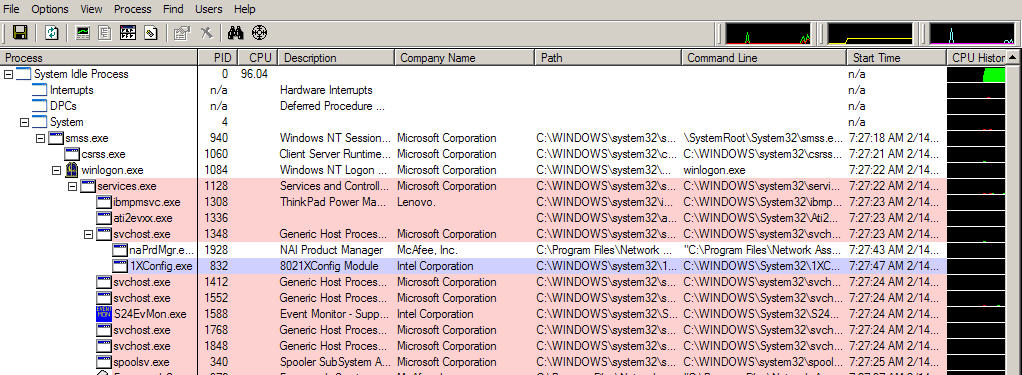
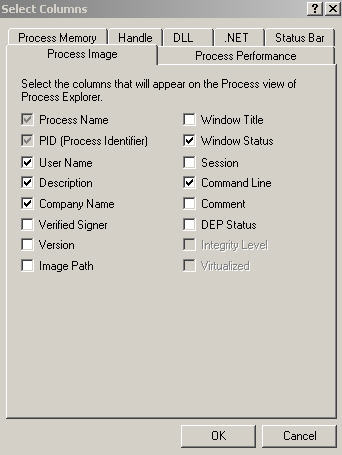
Process Explorer at first may look intimidating, but don't let that discourage you from using this tool. In the left window pane are all processes running on you computer. The right window pane has several columns. One column that you should add is the Command line column. This can be easily added by selecting from the menu, View, Select Columns then check Command Line and click on Ok.
As you can see in the first screen shot, all processes are easily identified by the Description and Company name. The two important columns are the Path and Command Line. These two columns display the exact location of the program that started the process and the command parameters that ran during execution.
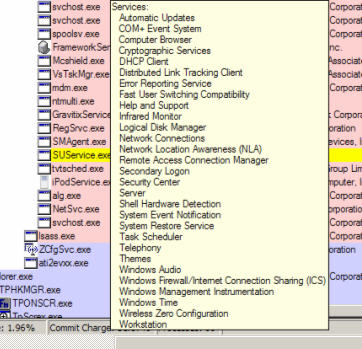
One sign of a rogue process is usually when the Description and Company columns are blank. If you suspect a process is suspicious, check the directory location where it was started, and see what date the directory was created. Also mouse over the process as shown in the screenshot below, and see if there are any services running for the process. In this case the process svchost.exe reveals all programs it has started.
You can also right click on a process and select properties which will display all information of the process such as Security, Environment settings, Performance and Threads. Two tabs that will be of most interest is the Image tab which displays path, command line and current directory of the process, and TCP/IP tab that identifies port and connection information which can be of value in understanding who the process is communicating with.


If you suspect a process is a problem, you can kill the process and see if it restarts on it's own (a real sign of spyware or virus). You can kill a process either by right clicking and selecting Kill Process or from the Image tab by selecting properties. Make sure no applications are open to avoid data loss before killing a process.
TIP: Not sure what a process is, right click on the process and select Search Online. Your browser will open and the process name will be searched online. From there you can start to investigate and find detailed information about the process.
Process Explorer is a powerful tool that can provide a window into your Operating System and let you see what is running on your System. A good idea is to run the tool once a day so you can get used to seeing what processes should be running normally on your System. If you suspect something is wrong, you can then easily identify any process that are not recognizable and quickly determine where the process is located on your PC and if it causing problems.

Pings on How To Identify Unknown Processes In Windows
Comments on How To Identify Unknown Processes In Windows
The URL in the article is bad; use http://www.microsoft.com/technet/sysinternals/ProcessesAndThreads/ProcessExplorer.mspx
Thanks Bob! I have also corrected the link in the article.
if, in fact, the process restarts once you kill it, how do you get rid of it?
You should first search for the process name at Google to identify what the process is.
If it is a virus or spyware and you have an antivirus or antispyware software installed, run a full scan (make sure the software is up to date). Otherwise, for System processes you can leave it running
Very useful… reminds me of the bad old days of windows 95. i havent had to look at system internals since i started using windows xp but its a handy tool to keep on hand.
Hi,
I am trying to minimise the amount of data that is uploaded or downloaded in the background from the my Notebook to/from the internet, when away from wired internet connection.
When using the Notebook with a mobile phone for internet connection, the cost per MB is high, and I only want to use Outlook email, and a web browser, and to transfer small amounts of data.
However I find that svhost.exe (Generic Host Process …) allows many internet interactions which quickly amount to many MB.
Disabling svchost.exe prevents Outlook and IE from doing their normal internet functions.
Blocking svchost.exe from the internet with the firewall still allows many MB to transfer up & down in the background.
Windows works fine without an internet connection, so it does not need all these background uploads and downloads.
So, how do I allow only email and web page upload & download?
Solutions would be greatly appreciated by many people, I think.
I have disabled the automatic updates of Windows XP, Firewall (ZoneAlarm Pro) & antivirus (Nod32).
I have run Spybot abd Ad-Aware.
Regards,
John
@John Dobbie
I would think in your situation, your best bet is to configure your firewall to block all ports for outbound traffic from your PC, and only allow the ports needed for outlook and your browser to communicate with the destination location (source IP Address to destination IP Address).
Your problem really becomes difficult to manage because you want to use your browser, which means you need to allow firewall access for ports 80 and 443 (https) to the Internet, instead of just from source to specific destination (unless you know exactly what sites you want to connect).
So instead of trying to block svchost and figuring out which programs/utilities/updates etc, should not function when connected to a mobile phone, setting up your firewall rules for specific ports and addresses may be easier to manage.
Thank U very much for this tip …
I have been asking Tech. Support and HP why I have so much CPU usage … Find out that it was my HP printers at start up. Now there is no CPU useag but about 1 to 2 percent total of all svchost.exe.
Thank U again
Doug
i just downloaded process explore and i noticed that csrss.exe has no description and company name. Is there anything thing else i can do to find out if it is a rogue programme/
@Mario
That process should have a description and company name. You may want to scan your PC with an antivirus program.
Also, if you right click on the process in Process Explorer and select properties the path should be - C:\Windows\system32\csrss.exe and the Command Line should be similar to this - C:\Windows\system32\csrss.exe ObjectDirectory=\Windows SharedSection=1024,12288,512 Windows=On SubSystemType=Windows ServerDll=basesrv,1 ServerDll=winsrv:UserServerDllInitialization,3 ServerDll=winsrv:ConServerDllInitialization,2 ProfileControl=Off MaxRequestThreads=16
Awesome tool. Thanks
Very nice utility.Thanks for shaing.
After running , I see hardware interrupts take most of my CPU like 8-10 %. This is not normal. It never used to happend before. Is there a way to get rid of it ?