


 If you installed VMWare tools in Ubuntu or Kubuntu guests running on VMWare hosts, you probably noticed that VMWare tools does not, by default start up automamtically during boot. To start VMWare tools, you must run vmware-toolbox & manually at a command prompt. While this is good way of starting up VMWare tools, a better way is to have it start up automatically on Unbuntu or Kbuntu.
To start VMWare tools automatically from Kubuntu, we'll need to add a start up script to ~/.kde/Autostart directory (hidden), located in your home directory.
Logon to kubuntu and open a Terminal window by clicking on Kmenu \ Utilities \ Terminal from the panel. Next enter the following two commands:
echo "/usr/bin/vmware-toolbox - -minimize" > ~/.kde/Autostart/vmware-toolbox.sh
(NOTE: there is no space between hyphens before minimize)
and press enter. Then enter the following command:
chmod +x ~/.kde/Autostart/vmware-toolbox.sh
and press enter. Now the next time you restart, VMWare tools will start and minimize to the panel.
To start VMWare tools from Gnome, logon, then click System \ Preferences \ Sessions from the panel.
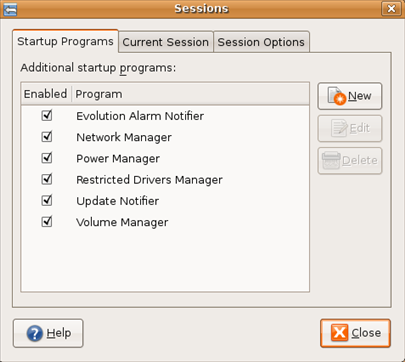
Click on the New button and in the New Startup Program window, enter
VMWare Tools
in the Name field, and
/usr/bin/vmware-toolbox - -minimize
(NOTE: there is no space between hyphens before minimize)
in the Command: field. Click OK to save.
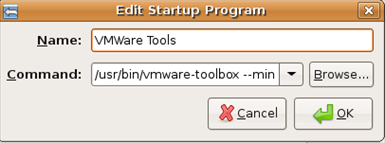
Next time you restart Ubuntu, VMWare tools will auto start and minimize to the panel. No more starting up manually!

Comments on How To Automatically Start VMWare Tools In Ubuntu And Kubuntu
oke thx, its usefull to.
I ever use it before but not run, but now its run well… thx.
joma @ 6:40 pm
thx,
remark: the option should read: -minimize not -minimize
Question: Is it necessary to start the toolbox at startup? (i.e. is starting up the toolbox enabling some functionality?)
@joma
I would recommend starting VMWare toolbox at startup since it provides improved video performance, mouse synchronization with the host OS (no need to release the mouse to go back to the host), and allows you to copy and paste between host and guest.
marlinman @ 10:38 pm
@joma, WTN:
thx folks… just in case anyone knows less about *nix than myself, the minimize option is preceded by TWO hyphens (displayed on this page as one long hyphen in my browser)
@joma
Thanks for catching the hyphen (before minimize). For some reason Firefox wants to display it as one long hyphen. I have edited the article and added a note.
bac @ 10:44 am
Hi!
There's any way to execute VMWare Tools in background? I mean without appearing in any panel.
Thank you!
bac
lucvdv @ 8:02 am
You don't need to start vmware-toolbox, a better choice is to use the command
/usr/bin/vmware-user &
This is per the vmware 6.0.2 docs. It starts the vmware user process, which takes care of mouse handling etc. in the background without any visual window.
If you want to change any settings, you can still start vmware-toolbox manually.
I suppose that vmware-toolbox starts vmware-user as well, if it isn't running yet.
Thank you very much for publishing this kind of article. I like your article a lot. I actually want to share my website details with you please produce some information to increase performance like as your website.