


 One question I get from new users to Ubuntu is "how do I view my computer name?"
Since most of these people are new to Linux and Ubuntu, or switching from Windows, they want to know how to view their computer name from the desktop, like they can in Windows.
Fortunately Ubuntu is user friendly and this can be easily accomplished from the GUI or at the command prompt.
To see your computer name from Ubuntu's desktop, just click on the Shutdown icon on the top panel next to the date and time, and select Lock screen.
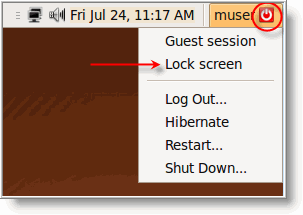
The lock screen will appear (if it does not, just click anywhere on the desktop or press any key) and your computer name will be displayed.
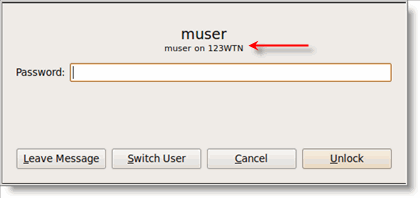
That was easy.
To view your computer name from the command prompt, click on Application \ Accessories \ Terminal from the top panel.
You will quickly discover that the Terminal window is more than happy to display your see the computer name which is shown after your username and in the title bar.

You can also execute the command hostname which will also display the computer name as well.
Now that you know how to view and display the computer name on your Ubuntu system, find out what else you can do in our Ubuntu tips section.

Comments on How Do I View My Computer Name In Ubuntu Linux?
… or you could just open a terminal…
Thanks for good info 🙂