


 One of the biggest complaints with using Firefox in Windows is the amount of memory it uses after long periods of being open. There are many reasons for this such as the number of Plugins, Themes and System Extensions running, not clearing the download history, memory leaks in older versions of Firefox, etc…
Probably the biggest culprit is the number of extension add-ons that are loaded when Firefox is started. Yes, were all guilty of having a ton of add-ons, but who can blame us when there are so many great extensions. While having to many add-ons can cause Firefox to consume memory, most of them do not always need to be enabled and should be disabled.
Start by identifying which add-ons are installed and enabled by clicking on Tools \ Add-ons from the menu.

Once the Add-ons window opens, it will default to the Extension view and list all installed add-ons.
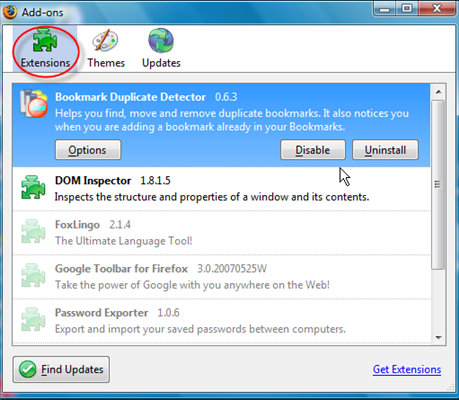
You should look for extensions that do not need to be enabled all the time. In the example above, I can disable Password Exporter. This add-on is used very little and does not need to be running when browsing the Internet.
To disable, highlight the extension and click the Disable button. The message "This add-on will be disabled when Fiefox is restarted" will be displayed.
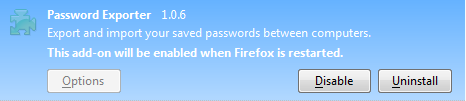
After disabling the add-ons that you do not want loaded when Firefox starts, close the Add-ons window and restart Firefox by closing and launching Firefox. You can verify the extensions are disabled by opening the Add-ons window and making sure the Enable button is present next to the extension you disabled previously.

The best extensions to disable are the ones similar to Password Exporter, which are only used when needed. Just enable the extension and restart Firefox. You do not need to uninstall the extension to get the benefit of having Firefox not consume more memory than it needs.

Comments on Firefox Tip: Save Memory Usage By Disabling Add Ons
6Q7i0p hi! hice site!
never thought about this. I would have thought that have 2GB of dual channel ram would allow any program to run fine but there is now a noticeable difference after turning off extensions.
Cheers!
Hi Everybody - This is a great forum
Just registered and wanted to say hello.
I thought these add-ons are one-way apps with no way to get rid of them. I see an 'uninstall' link but they don't seem to work. Well, at least we can disable them.
Hey James M. — here are a couple solutions -
- Create a new Firefox Profile:
support.mozilla.com/en-US/kb/Profiles
support.mozilla.com/en-US/kb/Managing+Profiles
- Uninstalling add-ons manually:
kb.mozillazine.org/Problematic_extensions
kb.mozillazine.org/Firefox_:_FAQs_:_Uninstall_Extensions
I'm looking for an extension that allows me to disable any number of extensions at once, and re-enable them the same way.
An extension that saved the list as a subset would be very helpful. If I have 36 extensions, and use 7,12,19, 21-26, and 29 for one activity, and a different group for another activity, then it would be nice to have a tool to switch them off and on as groups, when needed.
Me too. I would love to have an extension that let's me group extensions, so I can disable/enable groups at a time. I've heard of Collections and publishing them, and the Add-On Collector, but I don't think that's the same thing. Any help would be greatly appreciated!
Not only is it slow, Firefox sometimes hangs for no reason, consumes a large.
I would like to see a tip to refresh my firefox
tn xfor the information on how to disable addons.
What can you tell us about why Firefox is using sqlite to database our cookies, history, places visited, etc., even when we tell it NOT to save any such data and to purge all such data upon closing FF? We found a places.sqlite file on one of our machines that contained lots of data, mostly unencrypted, and included people's names and Social Security numbers from visiting sites like turbotax and the like! Needless to say, this is a serious security issue but nobody seems to be aware or bothered by it. Even more concerning is the fact that FF recreates these files if you delete them-including replenishing the file with data you wanted removed. In other words, FF is using tecniques like the old Microsoft "mirroring" where if you delete a file it wants to keep, it makes another, and if you delete that one, it makes another…
This is all very annoying and concerning to those who wish to use the internet in a safe, secure way. It also makes us wonder if Firefox is to be trusted, since they give the impression you are clearing private data from your browser and hard drive when in fact you are not. It's just that you are not aware of the secret squlite files housing all your private stuff!
What say you about all this?
Can you help. I am a chrome user. But my chrome not work properly can you help me. It taking long time to loading a page..
Disable