


 There is nothing like being able to use one application or interface to do most of your work on your Computer. Instead of needing to bounce back and forth between applications, I'm always looking for shortcuts to get from point A to B in the least amount of time.
One method that I have been using for a long time, is to use Firefox for browsing my hard drive (or mapped drives) and open files without needing to use Windows Explorer or an application.
This little trick, known as "File URL" format, allows you to browse files and directories on web servers instead of using other known protocols such as FTP. Although it's cumbersome to use on web servers, it works great on you PC. Best of all, the functionality is already built into Firefox.
To browse your hard drive, for example on a Windows Operating System such as XP or Vista, just type:
C:
NOTE: In the below screenshot the path changes to the "File URL" format automatically.
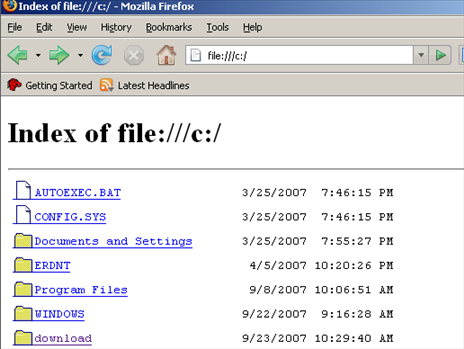
From here, you can navigate the file system, by clicking on folders as if you were using Windows Explorer and navigate around. Or, if you know the full path to a folder, you can enter it directly in Firfox's address bar shown below:
C:\download
You are not limited to browsing just local drives. You can browse other Computers either by first mapping a drive and using the drive letter, or by share name.
To connect to a share, just type the computer name followed by the share name:
\\computername\sharename
NOTE: If the share is password protected or the Everyone group does not have share access, you will not be able to connect and browse the share using Firefox.

While browsing files systems is convenient, opening files is also possible. As long as Firefox file type associations exists, you can read text files within the browser window:
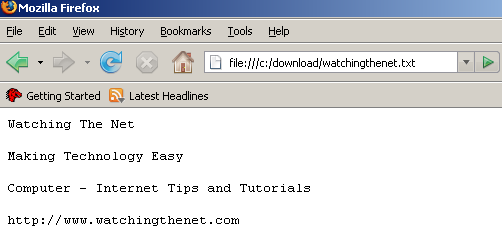
When clicking on other file types, such as Microsoft Office, Open Office documents, PDF files, etc.., if the extension is loaded in Firefox, you will be able to browse the file with in the browser window. Otherwise, the Open dialog box will launch with the application selected, allowing you to view the file in it's application.
TIP: Don't forget, since you are using a browser, you can bookmark folders and shares the same way you bookmark websites!

Comments on Browse And Open Files On Your Hard Drive Using Firefox
Marc @ 11:27 pm
I'm sorry. Do I need a pluggin to browse Windows with Firefox. I tried but it don't work. A friend tried too and it didn't work for him.
@Marc
Nope, no plugins needed.
Downloading The Net @ 12:17 am
Very interesting feature. I never used it before, I didnt even know it existed. Nice little time saver. I see some other nice tips on here I may use. Bookmarking your site now! Appreciate the tip. 🙂
@Downloading The Net
Glad to help out and thanks for the compliment. Also…that's a cool name
Nige @ 7:29 pm
this work fine for local drives ( e.g file://c: ) or mapped drives ( file://h: ) but not for shares as suggested \\computername\sharename ( e.g file://comptername/share$ ).
Any suggestions?
Nige
@Nige
Is the share password protected? If so, password protected shares cannot be connected to using Firefox.
Nytro @ 10:26 pm
how does this work on Ubuntu?
l3utterfish @ 12:29 pm
what if i want to do the opposite?..
i mean.. i have a html file with my movie listing (created by "simple movie catalog") and when i click on the movie file i want it to be open in the explorer container directory.. not in firefox.
Any way of doing that?
Shawn @ 5:33 am
Can we shift an application within firefox by using some extension. I remember Katiesoft browser had such an option.
So for example if you have opened a word document, you can open that in one of the broswer window, without the application being displayed in the taskbar.
faith @ 12:16 pm
Can you block this feature?
Page @ 12:29 pm
How do you block this feature to open local drive addresses with explorer and not firefox? There are so many more ways you can manipulate files with explorer than with FF. I store local links in my bookmarks and want to have explorer open when I click on them.
Jamshid @ 1:03 pm
For Windows network shares like \\miranda\patches\ Firefox seems to want three slashes after "file://". IE works fine with either two or three slashes.
file://///miranda/patches/
Jamshid @ 1:55 pm
Weird, using file://///server/folder/ (five slashes) works in Firefox when you type it into the address bar, but not when it is a link on a web page. Maybe related to this bug, maybe there are config options to enable those links.
https://bugzilla.mozilla.org/show_bug.cgi?id=122022
Page @ 6:10 pm
Jamshid
I ended up using a plugin called Coral IETabs that can be set, through filters, to automatically display a local drive address in an IE window instead of FF. IE displays the filesystem as a normal explorer window.
To browse the internet and your local filesystem smoothly, use Coral IETabs but turn OFF this IE filter:
/^file:\/\/\/.*\.(mht|mhtml)$/
and make a new one that looks like this:
file:///*
Page
Teja @ 1:25 am
nice one…works perfectly….i never tried it bfore….!!!!
TFS….
jerry @ 10:55 am
What is the difference between file:/// and file:///// (the number of slashes)?
farid @ 6:44 am
how can i disable this feature?
dalobo @ 3:11 pm
I cant get file:/// or file:///// or ///server1/file1 or //server1/file1 to work in Dokuwiki and firefox 3.6.13 on Ubuntu.
Any ideas?
Flu @ 1:46 pm
Is there a way I can get a local .exe file to run via a link on a local html file? For example, on my C:\ drive I have shortcut.html, and in it I want a link that when I click, opens calc.exe - if I do a link, it only offers an option to save it, is there a way to make it run?
Flu; there is not. Firefox browses the web and is not a shell.
Meaning: when you browse the web you can't run software, so they havn't included any support for it when browsing the local drive.
There might be a plugin for that though.
Rakuten @ 6:29 pm
Hallo !
Can I use this feature to drag and drop files into a folder?
Or is this the same thing as Oscar said to Flu…
Gazzzza @ 5:56 am
Can we have thumbnail views for picture files?
rdnard @ 2:11 am
no you dont need any plugin the simple thing is just to right click on the file and choose open with. the various options will open for you to chose witch program you want to use to open it with
hfkad @ 5:23 am
itz gud
hfkad @ 5:25 am
itz gud nd
arthurfl99 @ 9:20 am
I need to disable this feature for audit and security requirements. Does anyone know how to disable it?? thanks.
Reinier @ 2:49 pm
how on Mac OS X?