


 For anyone who has experienced losing a contact list or address book from your Cell Phone or PDA, you know what a nightmare it can be. Especially if it was never exported or backed up. The same applies to your Webmail address book in your Comcast email account.
Think about the many hours it would take to re-create all the entries in the address book, if you did not have a backup saved in a safe location. Fortunately Comcast has an export function to easily export contacts, so you can save them in a safe location.
The following procedure only applies if you are using Comcast Webmail. If you use another email application, such as Outlook, Outlook Express, Thunderbird, etc, refer to those applications documentation for exporting the local address book.
First log on to your Comcast (xfinity) account and access your mailbox.
- Click on the Address Book link in the menu bar.

- After the address book opens, click on the Export All link (shown in below screen shot).
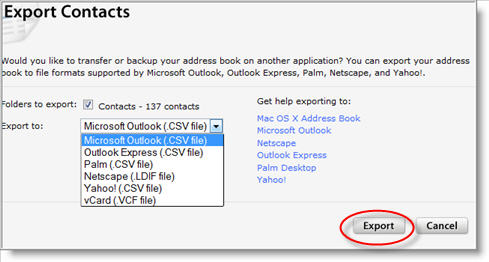
You will then have a choice of six formats for exporting. Select either, Microsoft Outlook (CSV), Outlook Express (CSV), Palm (CSV), Netscape (CSV), Yahoo (CSV), vCard VVCF file). If you are unsure, select MS Outlook Express CSV.
- Next, click on the Export button and save the file to a location on your disk, or better yet on another hard drive
 or USB Drive.
- When prompted, specify a location and name for the file in the Save As dialog box. Then press Save.
If the export windows remains open after the export has completed, just click Cancel to close it.
Now that you have exported your entire contact list from the address book, if needed you can easily import them into Yahoo, Outlook, etc…,by following instructions located at this link.
But you will notice that there is no import capability to import the contact list back into your Comcast address book.
This is for good reason, because Comcast provides a backup and restore feature, that allows you to never worry about needing to backup your address book. Best of all the backups are automatic and enabled on your account by default.
To run a restore, simply follow the instructions for how to restore your Comcast (Xfinity) address book.
If you ever have any issues, make sure to contact Comcast and let them know. After all you are paying a lot for the service!

Comments on How To Export Your Address Book From Comcast Webmail
Carole Brooks @ 9:03 am
How do you export contacts from Comcast's new DUMBMAIL…they call it Smarzone but it's a piece of crap and has no export button on it's address book.
@Carole Brooks
On the top menu below the Smart Zone header, you will see links for Home, Email, Voice, Address Book, and Preference.
Click on the Preference link, then scroll down until you see the Import/Export section.
drtjyen @ 11:52 am
I want to transfer my Comcast Webmail addressbook to Entourage (Mac OSX). What format should I export my files in ? so I can import it from Entourage ?
ashleys @ 2:59 pm
i want to export my address book to msn's windows live but when i try to export what format do i choose? the one they want isn't an option.
David Swoboda @ 9:58 pm
Carol B referred to Comcast's new SmartZone as DUMBMAIL… YES IT IS … my 3 other email address have disappeared; after reading an email & deleting it used to open the next email but NO now we go back to the email menu to DOUBLE click to open the next mail & finding the Address EXPORT is like digging for clams .. come to think of it that's easier …. all my weather places have disappeared & I only have one now ….. I used to open right into my email account, now I come to a page to select email or voicemail which I don't have (just more mouse clicks to aggrevate the user)and don't try to send them an email for help, there is none and if you get to do that no one answers I had to call on the telephone ….. and when viewing the address book list view where are the email address ??? you only get them in the card view … and guess what I have tried to attach a simple Microsoft Word docuument several times and it won't do it, I had to log into my YAHOO account to get that done in 2 sec …. and your folders view on the left is fixed you cannot rearrange it to suit yourself …. I could go on with more but Carol is right it is DUMB MAIL … it was designed by IT people for the IT literate who are ONLY 10% of the user base and the 90% of the rest of us have to suffer with their ideas which management bought into. WE NEED CHANGE WE CAN BELIEVE IN
David Swoboda @ 12:19 am
I have tried to export comcast's address book in every format they offer to my desktop and then import to yahoo and ALL FAILED due to INVALID csv exported files by comcast. Another Comcast brilliant idea ….. can anyone help me with a solution ?
Richard Dick @ 10:19 am
What is the procedure to export comcast email messages to my computer's hard drive. Comcast's Smart Zone is not user friendly. The previous issue was much better.
@David Swoboda
Check the CSV file for any invalid characters or other possible issues before importing into Yahoo.
@Richard Dick
I don't recall a method to "export email messages" in previous versions other than using POP3 protocol. Is this what you are referring to?
LAS @ 8:16 am
Yes, it is DUMBMAIL. I'm trying to switch to OE and still can't export my address book. I'm probably going to switch to FIOS so at least won't have DUMBMAIL anymore.
@LAS
See if this export option exists in SmartZone for you:
- Go to your Comcast Inbox
- Click on Preferences (on the toolbar)
- Scroll down to the Import/Export section and next to Export, select Comcast Contacts then click on the export button
Catherine W @ 9:36 am
I'm also trying to export my comcast address book-to anywhere! When I go to Preferences as described by @LAS, no import/export option comes down. Is Comcast purposely eliminating this option? The ill will generated is huge!
Dreed @ 7:43 pm
It worked. The virtual monopoly that Comcast enjoys has caused it to become fat and happy in that Comcast, like any other monopoly, is not fearful that its customers will vote their displeasure with their feet, i.e., by walking away taking their business elsewhere. Why such a simple task has been made so difficult I will never know. Nevertheless, I am now free to walk away from Comcast, thanks to your wise counsel.
Take care.
Yakov Zeltser @ 12:26 pm
I use comcast address book,I don;t have export-import button on the address book
Can you help me?
Thank you!
Max Scruggs @ 2:55 pm
Following @LAS's February 21, 2009, directions at Watching The Net @ 10:08 am did not work for me. HOWEVER, all you need to do to get to import/export, is go to Smartzone, click on Preferences and click on Address Book.
Laura @ 12:34 pm
My dad has comcast smart zone and there is NO import/export option anywhere. Not in preferences, or address book….no where. This stinks.
IT_Guy @ 4:17 pm
@LAS left out one small detail. After you click on Preferences, click on Address Book on the line below Preferences and you should then see th export function.
Mike @ 10:31 pm
My wife wants to use her thunderbird address book on comcast webmail for her new laptop. I exported it into csv format, found the import/export tool on comcast, but it hangs on the "choose an address book to import to" window. Nothing happens when I select address book at all, when I select "contacts" I get a rogue script error message. Has anyone got any suggestions?
Janice Daye @ 5:07 pm
I would like to know how to transfer my e-mail file folders to a flash drive?
There are no options that I can find in my e-mail that will allow me to do this!
Please Help!
@Janice Daye
The only way to backup your email (then eventually copy to your flash drive) is to use an email client such as Outlook Express or Thunderbird.
For instructions on how to set up Outlook Express with your Comcast email, see their how-to -
http://customer.comcast.com/Pages/FAQViewer.aspx?seoid=Configuring-or-setting-up-Outlook-Express-for-email
Chuck @ 9:24 pm
You're much better off just dumping a hard copy of your CSV and TYPING IT ALL INTO your new address book (especially with Thunderbird). The CSV fields are all set up different with the email progs (depending on fields used, etc.) so you're WAY ahead of the game if you just enter them fresh in your email program instead of wasting time trying to figure out (futile) how to import. I supposed you could bring the CSV into Excel and try to re-order and rename the columns but by the time you're done screwing-around with it you'd be way ahead of the game just retyping them from scratch.
how can I export my address book from Comcast @ 2:15 pm
@Carole Brooks:
Outlook Setting @ 6:34 am
Export your Comcast Address Book by clicking on the "Preferences" tab, scrolling below to the "Import/Export" section, and then clicking on the "Export" button. Once you click on the "Export" button, an address book dialog box will open; choose the "Contacts" folder under the "Address Book", and then select the "OK" button. This will open a download dialog box; select the "Save File" option to save the address book file on your personal computer . Your address book will be saved in the Comma-separated Values file type.
c grovatt @ 1:17 am
I would like to merge my comcast address book with my macbook pro, however I purchased the student home edition without the outlook express component. I don't think I can buy outlook by itself. Is there a way to export my address book from comcast to my macbook pro without outlook express installed on my mac?
my account is closed an i can not get my mail is there a solution? comcast is a mess @ 9:02 pm
wish i never switch to comcast
charles g walls @ 7:54 pm
I tried to export my email address…after i clicked the "Export All" button, it keeps reading "Sorry, we were unable to load this page"…so what I do ?
hollis jackson @ 10:12 am
As of 2017, the export button does not show up!!!
WTF!!
Tim polosky @ 7:55 pm
Wrong, after clicking on address box, there is now box that comes up, welcome to your address book
Alex Calero @ 2:03 pm
@drtjyen: I need to backup my address email from Camcast to usb or folder I use apple computer.
Thank you,
Alex
Alex Calero @ 2:05 pm
I need to backup my email files from Comcast I use IMac computer