


 One change in Vista's Windows Explorer that I really like is the addition of filters. Filters allow you to choose how you want contents of a folder displayed, which makes finding files much easier, especially in large folders and sub-folders. One example of using filters is when you need to find files by their file type extension (exe, mp3, doc, etc…).
What's cool about using filters to find files of the same type, is that you don't need to know the file extension name and you can group and sort them, which allows you to easily view the files of the same type.
To see how you can use the file type filter, just open Windows Explorer by doubling clicking on My Computer or any folder shortcut on your desktop and navigate to a folder that you want to find a specific file.
Now, mouse over on the "Type" column and you will notice an arrow will appear.
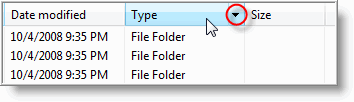
Clicking on the drop down arrow will display a list of programs that you can select to view by it's file type.
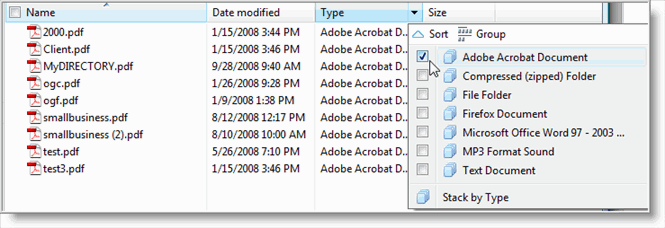
Take notice, that Vista filtering system only displays the programs that are present in the folder. This let you choose only the program file type you are looking for, with out needing to scroll through a long list of programs.
Also, you are not limited to selecting only one file type, You can make multiple sections using the check boxes.
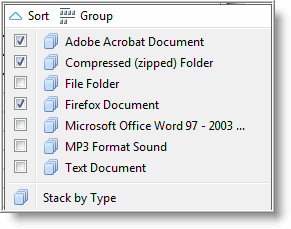
To make it easier to view the selected files, click on the Group icon so the files of the same type are group together (also notice that the number of files are listed next to the program name).
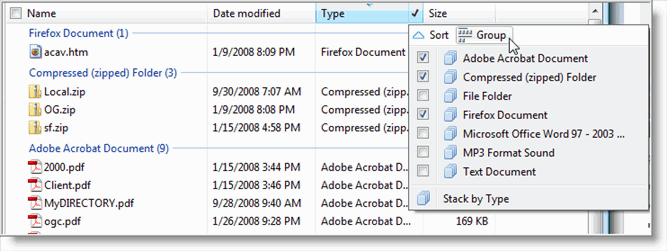
To help you remember that you have a filter set, Vista will display a check mark next to column name (in our example this is the Type column).
When you are finished, and want to turn a filter off, you can un-do the settings you made by deselecting the check boxes to return the view to normal.
Using Windows Explorer filters in Vista, makes organizing your files much easier by changing how the content of folders are displayed. Once you get the hang of it, finding files becomes a whole lot easier.
Want to see what else is new with Windows Explorer? Check out 12 Hidden Windows Explorer Tricks.

Comments on Use Vista Windows Explorer Filters To Find Different File Types In Large Folders
This is useful and quite straightforward, but I am looking for something more. I would like to filter my Explorer tree to only show folders which contain a certain type of file, i.e. jpg or mp3 etc? Any ideas?