


 I just started using the new chat feature in Yahoo Mail Beta and notice when I receive a chat message from one of my friends there is a bubble sound. I chat frequently with my friends and it has become annoying every time someone wants to chat with me. How can I turn off the sound notification?
If you have not noticed, or switched to the new Yahoo! Mail Beta yet, Yahoo has integrated their Messenger (chat) to Yahoo Mail. Yahoo has just begun to roll it out to all users. When it becomes available to you for the first time, you will notice pop ups pointing to the new Messenger icons.
One feature of the integrated Yahoo! Messenger is sound notification. When a new chat message is received, you will hear a "bursting bubble" sound. Unfortunately, you can't change the sound but you can disable it.
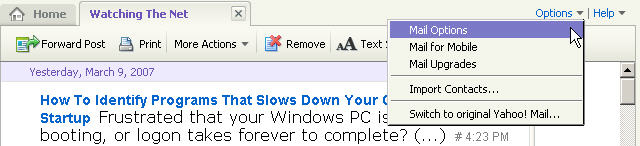
To disable, go to Options and select Mail Options:
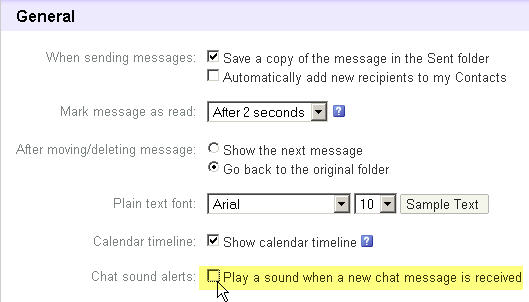
In the General section for Chat sound alerts:, deselect Play a sound when a new chat message is received.
Now you will be able to chat with your friends in peace!

Comments on How To Disable Sound Notification In Yahoo Mail Messenger
Yolanda @ 11:00 am
Thank you Thank you Thank you! A million times, THANK YOU! I was going nuts with that bursting bubble sound!
carina carbungco @ 10:46 pm
i got the same issue im really getting nuts…my mail options its the same …is there any ways to disable the sound? plsss help me….