


 Troubleshooting Windows problems and errors is difficult enough. But when the dreaded blue screen of death occurs, Windows adds to the frustration with it's default setting to automatically reboot Windows during System failures.
Fortunately, there is an easy fix to eliminate automatic restarts with Windows when an error or BSOD occurs.
Click on Start \ Run… (or press Windows key - Win+R) and type sysdm.cpl and click OK.
In System Properties window, click on the Advanced tab, then click on Settings button under Startup and Recovery.
NOTE: Screen shots are from Vista, and will be similar for Windows XP.

In Startup and Recovery window, uncheck Automatically restart under System failure section. Click OK to save setting (then click OK to close System Properties Window).
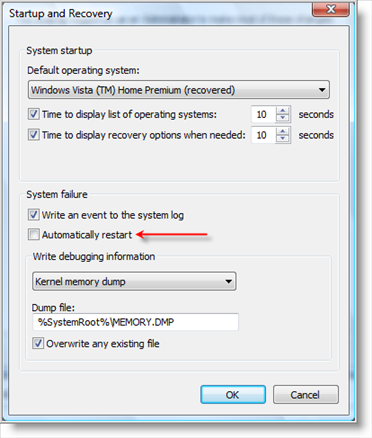
Now, if a System failure or BSOD (Blue Screen Of Death) occurs, you can easily write down the stop error code and other information…with out needing to reboot a hundred times to see the error message!

Comments on Prevent Automatic Reboots During Blue Screen Of Death In Windows
JB Underwood @ 2:05 pm
Okay, thanks for this… But after, when i get it… I'll copy down all the codes and stuff, but sometimes if I google them NOTHING comes up at all… Suggestions please?
@JB Underwood
Try Microsoft's site using the advanced search at http://support.microsoft.com/search/?adv=1
Not that it may be any more help, but worth a shot.
Doug Woodall @ 8:25 am
I was suffering from alot of BSOD's during the first 4 months I had my new lappie with Vista.
Was just about to return it when the last set of Hotfixes resolved the problem. When this type of problem occurs, you really need to see that message, even if you cant find a solution, you need to save those messages for tech support.
shahiran @ 1:19 am
Hey Thenks so much really helpful thanks again.
Anthony V. Gibby @ 4:26 am
Thanks for this tip. This something I never noticed.
Frost Pyush @ 7:06 am
error used to occur alot
but nw it has improved alot
thanks alot