


 How many times has this scenario occurred?
You need to edit or modify important files or documents and decide that you want to copy them to another location on your hard drive as a precaution. After selecting multiple files, you left click and drag them to another folder.
But just before releasing the mouse button to drop into the folder, you realized that you had left clicked on the selected files, instead of right clicking, which will cause the files to move (not copy) forcing you to start over again.
If you had right clicked on the selection of files then dragged and dropped, Windows will display the context menu giving you the option to Copy, Move, Create Shortcut or Cancel the operation.
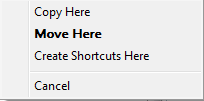
Instead of starting over again after left clicking, you can control the operation that will be performed, and still select the same options in the screen shot above by using the Keyboard.
Here's how to do it:
Before releasing the mouse button:
- To force a Copy - hold down the Ctrl key (Control)
- To force a Move - hold down the Shift key
- To force a Create Shortcut - hold down the Alt key
- To force a Cancel = press the Esc key
You will notice in Vista or XP the cursor will change to reflect the selected operation.
With Vista:
Copy = 
Move = 
Create Shortcut = 
With XP:
Copy = 
Create Shortcut = 
In XP, Move will not change the cursor.
NOTE: this tip will only work when moving files or folders on the same drive. By default, Windows automatically copies files or folders between dives and partition when using left click

Comments on Windows Tip: Control Drag And Drop Options With Your Keyboard
Ian Jones @ 7:08 pm
Useful tip thatnks.
For some reason the cursor no longer changes to indicat copy or link although the action still works.
Any idea what could cause this or where I could reset the effect?
Guntis @ 5:10 pm
please how to change that if on my right click and move it doesnt meve but copy?
Barbara @ 8:30 am
I have window's 7. how do I drag a page?
Deepak Gupta @ 4:53 am
the Best and most perfect response to my query , Thank you !