


 Not long ago, having one printer attached to your Computer was all you ever needed for typical print functionality. Today with Network printing you may have several printers installed, especially if you share your laptop between home and the office.
The problem with having more than one printer to choose from, is that only one can be selected as the default printer in Windows. This can become a hassle when you want to print, only to be prompted to choose a printer.
Fortunately there is a small utility from Microsoft that will run in the System tray and allow you change the default printer by just right clicking.
Default Printer, which is part of the Windows 2000 Resource Kit, can be downloaded at this link. It will run on all versions of Windows including Vista. Best of all, it's free!
Just unzip defptr.zip to your desktop or any folder on your Computer and double click on Defptr.exe to launch the utility.
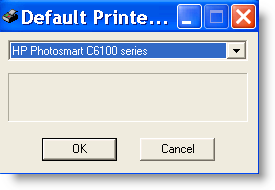
Default Printer is very basic and requires no installation. Once launched, click on OK and it will minimize to the System Tray.

To change your default printer, right click on the printer icon in the System Tray and select the printer you want set as the default.
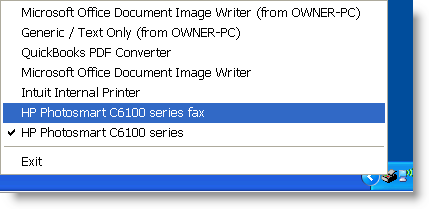
Next time you print, you will not need to select the printer because the default is either not online or it's used at the office.
To make Default Printer launch at startup, just drop Defptr.exe into your startup folder, by right clicking on Start and select Explore.
When Windows Explorer opens, expand Programs, then copy Defptr.exe to the Startup folder.

Comments on Switch Default Printer On The Fly In Windows
Hi there,
great tip!
For those among us who use Autohotkey, I have written a small script allowing you to enjoy printer-switching by just a few lines.
I have specifically designed it to be a help for those who mainly switch between two printers (out of a pool of an unlimited number of printers). Nevertheless it is KISS-enough to be easily expandanded.
You can find my script here: http://www.autohotkey.com/forum/viewtopic.php?p=115849
Have fun!
Christian Sentis
Great, also fixed my issue with Vista not allowing the default printer to be set! 🙂
Could not set my default printer after installing Vista SP1. I would click on set as default printer for my HP, nothing happened! This works like a charm, now I can set my default printer, and I am back printing online coupons again! Thanks a Million 🙂
@thomas
Glad to help out. It's the small utilities like Default Printer that always seem to make the difference.
Using Vista Home Premium (Service Pack 2) in my system, I must choose in defptr.exe Properties (right click in the file name with the mouse)-> Compatibility Tab —> Windows 2000 mode. Now is working fine.Thanks for this tip.
We have a little app that allows you to do the same thing and you can setup rules so that it will switch automaticly.
Now you can change your default printer based on SSID or network configuration.
you can download a free copy here:
http://www.northrivertechnologies.com/print.htm
Anthony's link isn't working; it should instead be http://www.northrivertechnologies.com/printer.htm
Hello all,
I see the last post here was 2010, so hopefully someone can assist me…. This thread I believe will do what I need.. I think.
I have a kiosk and need to switch between 2 printers. By changing the default printer in code this will do the trick, unfortunately I see the code attached to this thread and I can not get this to work at all.
I have a thermal printer on the KIOSK and from time to time a page of text 8 1/2 x11 needs to be printed. The kiosk thermal printer is currently set to the default printer. I would need to switch the default printer, print the 8 1/2 x11 page and switch back to the original default printer. Do you know how I would code this into and ASP page?
PrtPrinter1.ASP
**********************************************************************************************************
Printer 1
Print this on the default Thermal Printer
****************************************************************************************
PrtPrinter2.ASP
**********************************************************************************************************
Printer 2
——-CODE TO SWITCH THE DEFAULT PRINTER HERE———- or somewhere on this page—-
Print this on the New default Printer 8 1/2 x 11
****************************************************************************************
I have been trying different things for weeks and no luck. Any assistance would be greatly appreciated.
Thank you ,
John