


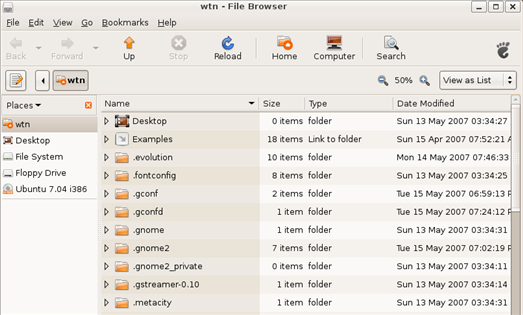
 When browsing the file system in Ubuntu using Nautilus, the default view is to not show hidden files. You can easily toggle this setting on or off using the keyboard shortcut Ctrl+H or selecting Show Hidden Files from the View menu in Nautilis. But the setting is not permanent once you close Nautilus. Fortunately there is an easy fix to make this setting permanent.
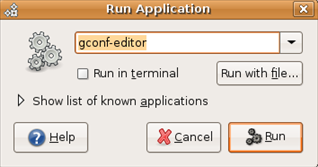
To make this change bring up the run dialog box by pressing Alt+F2 and type gconf-editor, then click on the run button to bring up the Gnome Configuration Editor.
Now browse to the following key:
desktop / gnome / file_views
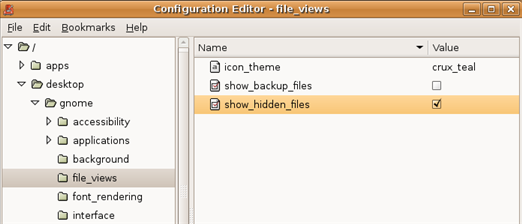
In the right window pane, look for the entry named show_hidden_files and click on the check box to set the value to true (shown by the check mark).
Now when you browse the file system on your Ubuntu computer, Nautilus will always display hidden files.

Comments on Always Show Hidden Files In Ubuntu Nautilus File Browser
PENIX @ 12:19 pm
I had no idea this was such a mystery to Ubuntu users.
Natasha @ 9:37 am
no need to do all that. in Nautilus, just click on "Edit" -> "Preferences", and under "View", you can check the box for "show hidden files…."
=))) ctrl + H ? =)))
pile of Linux idiots ….
The only idiot here is F. Cisco
He discourages folks from posting very helpful tips that other have been searching for. Users may know a lot about Linux but may be new to gnome and nautilus may just be learning.
Please continue to post your helpful ideas.
@volker
No need to worry about that. The helpful posts will continue!
… … ….
Seriously, this is needlessly complicated. Here, let me revise this article into one sentence.
Hit CTRL + H.
Done. It'll stay across sessions, it'll stay until you hit CTRL + H again.
This article is stupid and reeks of an Ubuntard.
WOW Yaro, I am impressed with your Ubuntu nerdness.
"WOW Yaro, I am impressed with your Ubuntu nerdness."
I don't use Ubuntu. I use Arch.
Why in the hell would you want to do this? The files are hidden for a reason.
Hobi @ 5:30 am
Good article, thanks.
I was have problem with hidden folders, they allways showed.
Even if i "in Nautilus, just click on "Edit" –> "Preferences", and under "View", you can check the box for "show hidden files…." or CTRL+H, they was back when i restarted Nautilus, but not any more. Thank U
Oh, and one last thing, before I forget, it's not Ubuntu Nautilus. Nautilus is not an Ubuntu application, but a GNOME one, and Ubuntu is FAR from the only GNOME-centric Linux distribution in existence.
It's just called Nautilus, and it has little more to do with Ubuntu development than it does for SuSE or Fedora or Arch or any other distribution that has it.
The Linux universe does not, never has, and never will revolve around Ubuntu. The sooner Ubuntu users can get over their popularity, the sooner people outside of Ubuntu users will stop being so annoyed with the Ubuntu community.
Thank you very much!!
I always had stuck with that! Not anymore!