


 Probably one of the most frequently accessed directory on your Ubuntu desktop is your Home directory. Everything you create and save more than likely resides some where in your Home directory, unless you are on a Network that has a file server. Because it is a directory that is accessed frequently, I like it one click away instead of keeping Nautilus open and cluttering up the panel.
An easy way to keep it one click away and easily available is by adding a shortcut to your Home directory on the GNOME Panel.
To add the shortcut in Ubuntu to the panel, right click anywhere on the Panel and click on Add to Panel…
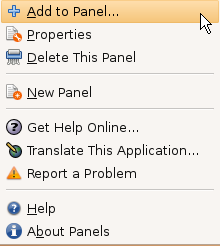
In the Add to Panel window, click on Custom Application Launcher

In the Create Launcher window, select and enter the following information shown in the screen shot below, and substitute the path to your Home directory in the Command: field in the following syntax:
nautilus /home/yourusername (path to home directory is case sensitive)
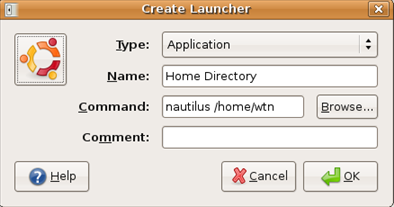
Clicking the Browse… will allow you to select any icon that will be displayed on the Panel.
Click OK and then close the Add to Panel window. You should now have an icon on the Panel, and with one click your Home directory will open.

If you want, you can add shortcuts to other directories that you access frequently using the nautilus command.

Comments on Add Shortcut To Your Home Directory On Ubuntu GNOME Panel
Thanks for the tip. Is it possible to add a â€Multimedia†folder on the panel, witch include sub folders like Music, Movies, E-books and so on? My multimedia stuff are on different folders, can I symlink them or something?
@Andre
You can add any folder to the panel in the same way the article describes adding your Home directory. In the Create Launcher window, just enter the path to the "Multimedia" folder after the "nautilus' command.
There is a far easier way to do this.
Click Places, then drag & drop "Home Folder" to the panel.
Cool, thanks for the great tip Jared!
It's work, thanks, can you help me to create command: gbr2 /home/user/unit.gambas auto run at booting or how to create that shortcut autorun when booting, thx
@wahyu budhi nugroho
Not sure if you are using Ubuntu or Kubuntu, but see the following article on what I used to auto start VMWare tools -
http://www.watchingthenet.com/how-to-automatically-start-vmware-tools-in-ubuntu-and-kubuntu.html
How about internet locations? Windows has a convenient "Save shortcut to desktop" command
thanks! I've just been wondering how to do that on Solaris 10. That method works with slight tweaks.