


 For Windows users making the switch over to Ubuntu, one of the first task to learn is how to add and remove software packages. In the Windows world, installing software applications is easily accomplished by running the setup program and using Add/Remove program to manage all software installed on the system. Security updates are usually installed using Windows update program.
On Ubuntu, the equivalent to all of the above is to use a package manager that installs, uninstalls, and keeps track of all the components each piece of software needs. To accomplish this when using GNOME, two package managers can be used: Aptitude for command line package management and Synaptic for graphical management. In Part 1, we'll look at Synaptic.
Synaptic Management
While many tools exist to manage software packages, for Windows users, it's best to get used to one tool. Luckily Synaptic can help with the learning curve. To open Synaptic, click Systems \ Administration \ Synaptic Package Manager (Synaptic requires root privileges and you will be prompted for your password to access), or from the command line:
sudo synaptic (and enter your password when prompted)

The main window is divided into several sections. The left sidebar displays the different package categories starting with All, then followed by each individual category. As you click on each catagory, the upper right window pane will display all packages available for the selected catagory. Installed packages will show with the checked boxed filled in. Clicking on a package will display information about the package below and right clicking on a package will display all necessary information such as version, dependencies, location of installed files, description, etc.
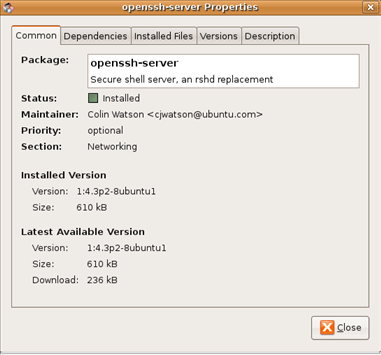
Configure Synaptic
In Ubuntu, packages reside in package repositories that includes all software and updates that can be installed. Sort of a central one stop shopping for software so you do not need to hunt around the Internet. Before starting, a couple of changes need to be made to download from the repository, include downloads for third party tools, and other settings.
In Synaptic Package Manager, click Setting \ Repository (root privileges is required and you will be prompted to enter your password) from the menu.
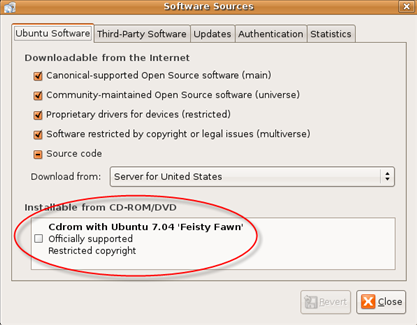
Ubuntu Software Tab
If you had installed Ubuntu from a CDROM, uncheck the check box under Installable from CDrom/DVD (circled in above screen shot). This will switch to using repositories on the Internet instead of the CDROM. Do not click close or exit just yet.
Next, you may want to add or remove extra software repositories to your system (4 repositories shown in above screenshot, directly above Cdrom option). Below list the different repositories and the pros and cons as why you may want to add them:
MAIN - Canonical-supported Open Source Software - contains all of the default Ubuntu packages, that have been tested and officially support by the official Ubuntu Project team. Leave enabled since this is considered safe.
Universe - Community-maintained Open Source software - because of the amount of testing required by the official Ubuntu Project team, Ubuntu distribution only contains a subset of Debians software. Universe is a subcategory that contains community software that has been packaged by supporters of Ubuntu. While there is a small amount of risk, it is safe to enable universe since the community does an excellent job of testing and fixing bugs.
RESTRICTED - Proprietary drivers for devices - reserved for software that is commonly used and supported by the Ubuntu Project team. Some of the software may not be completely available under a free license, therefore may not be completly supported by the team. This software is included because it is considered essential for Ubuntu to run on certain hardware, but is kept completely separate to it can be easily removed. It is safe to enable this repository.
Multiverse - contains packages that are considered copyright or includes licenses that need to be purchased and are not free. Disable this repository if you only want to use free open source software and not have to worry about licenses or copyright infringements.
Updates Tab
In the Updates tab, you will want to leave the first two boxes checked under the Ubuntu updates section. Next set the update frequency you prefer or leave it at the default of daily. It's best to leave the Only notify about available updates checked to provide a safety net so you know exactly what is being installed or have the option to uncheck and not install (for Windows users this is the equivalent of Automatic updates for patches).
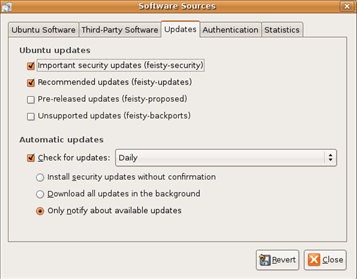
The remaining tabs, do not need to be configured at this time. Click the Close button, then click Close again in the Repository changed window. In the toolbar, click on the Reload button  to download any updates.
Installing Packages
Now to install packages, start scrolling through the list or use the search tool, and as you find packages to install right click and select Mark for Installation (note you can mark more than one package to install at a time). When packages are selected, click the Apply button on the toolbar. Synaptic will display a prompt of which packages will be installed along with other information and automatically download and install all selected programs. Synaptic will also prompt you if a package depends on another package to install and ask to approve the installation.
Remove Packages
To remove packages, just find the package, right click and select Mark for Removal (to leave behind any config files that may have changed) or select Mark for Complete Removal (to remove everything, including config files). Multiple packages can also be selected and uninstalled at a time.
Update Packages
One nice feature of Synaptic is the capability to update packages. Simply click the Mark all Upgrade button on the toolbar. Synaptic will mark any packages that need updating, then download and install them for you after you click Apply. You should run update periodically to make sure you have the latest fixes and security patches.
Setting Synaptic Preferences
Now that you are becoming familiar with Synaptic, you may want to customize the settings to your preference. To configure, select Settings \ Preferences from the menu.
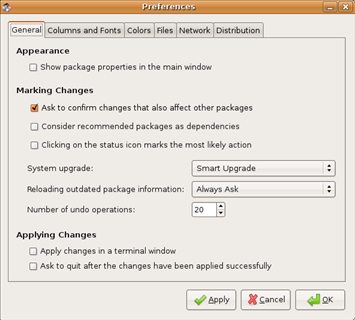
Preferences includes five tabs, General, Columns and Fonts, Colors, Files, Network and Distributions. Configure these options to your preference or leave them at their default settings. When finished, click Ok to save settings.
As a Window user testing or switching over to Ubuntu, using Synaptic to manage, add and remove applications and patches makes package management on a Linux based operating system simple. In part 2, we'll look at managing packages from the command using Aptitude which will become very userfull for remote management or automating using scripts.

Comments on Ubuntu Guide For Windows Users: Managing Packages With Synaptic And Aptitude Part 1
* Ubuntu Guide For Windows Users: Enable File Sharing In Ubuntu Using Samba
* Add Additional Directories To Ubuntu Desktop Search Index (Tracker)
* Ubuntu Guide For Windows Users: Reset Your Password When You Have Forgotten It
* Linux Tip: Tighten Up Security And Disable SSH Login For Root Account
Hi, thanks very good guide :). I have 1 question.
How do I use the packages that I download?. I have all day looking for it. I'm not familiar with linux. :(.
The original Ubuntu Guide (http://ubuntuguide.org) has been around since 2005, and the derivative Kubuntu guide (http://kubuntuguide.org) has been around since 2007.
these are excellent guides with information both for new users and advanced users.