


 Setting up your Linksys wireless router is easy using the Secure Easy Setup (SES) as it steps you through the configuration of creating an SSID, security settings, and connection information. Outside of SES, you probably have created a secure router password and setup MAC filtering.
Then one day your router stops working and you must reset it back to it's default settings, losing all the configuration information. Not a problem if you have a backup of the configuration that can be easily imported back into the router.
If you have not changed your wireless router IP address, connect to your router with the URL: HTTPS://192.168.1.1 and log on. Once you have connected to the administration interface, select from the menu: Administration - Config Management.

Then click on the Backup button and select the destination to save the file (consider saving it CD or USB drive for safe keeping).

If there is a need to restore the settings, first select the browse button and navigate to where you saved the backup file, then select Restore to import the configuration back into the router.
Wireless Adapter Backup
If you have a Linksys wireless adapter installed in your PC, you can also backup the configuration. Open the Network Monitor from the System Tray (green icon next to the clock) and select the Profiles tab at the top, then select Export and save to the same location as above with the router backup.
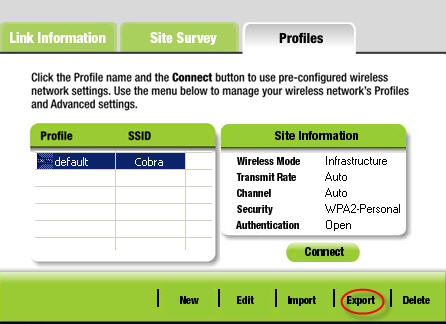
If you need to restore the adapter configuration, just select Import from the Network Monitor.
For tips on securing your Wireless Network, see 10 Tips To Secure A Home Wireless Network.

Comments on How to Backup Your Linksys Wireless Router Configuration
mel @ 12:49 pm
hi, is there any way to reset the linkys config if ever its been config already , i mean when you go to the config of linksys the color is blue right …but if its already has a password it will show black where you can see dwrt ….is that normal or can i reset it to factory setting mode …
@mel
To set a Linksys wireless router back to the factory defaults, look on the back of the router for the Reset button, then press and hold for 30 seconds.
Any settings on the router will be erased and the router’s IP address will become “192.168.1.1” and the password will be “admin.”
Sebastian @ 11:53 am
I can't backup my configuration.
My browser can't find the configuration file to download?
What am I doing wrong?
@Sebastian
If you connect to your Linksys router admin interface using HTTPS there is a bug when trying to backup the config file. You will need to enable HTTP access and re-connect (using HTTP) then backup the config.
After the backup is completed, make sure you disable HTTP access.
Barb @ 1:51 pm
@Watching The Net:
I tried to reset the router…it wants me to put in a user name and I never did that when I first set it up..the instructions said to leave it blank and use "admin" for the password. It won't work without a user name. I am doing this because I lost my internet connection and instead of buying a new router, I am resetting it all over again.
booch221 @ 12:29 am
I have a Linksys Wireless G router with Mac filtering enabled and about 10 Mac addresses entered. I want to get an N router. Can I use the back up file to import all my settings from the G to the N?
@booch221
More than likely you can't use the existing backup file. What I have done in the past was copy the addresses from the MAC filters list, then paste them in (one at a time) on the new router.
Guys!
I have been trying to be using this shut down command prompt from MSDOS command prompt but up till now I have now got a positive result.
The command is SHUTDOWN -I
Then I will input all necessary parameters as required but since I have been doing it I have not succeeded in shutting down a remote system.
Pls, kindly send your guide if you have previously succeeded in the command stated above.
Thanks your guide would be welcome.
Mr. B @ 9:38 am
Hi Got a old LinkSys Wireless Router,WRT54G, Firmware Version: v2.02.2. It works just fine so far. I need to back up the current settings on it but I don't see the "Config Management" under the "Administration" option.
Any idea? Is it because the router is several years old? Please let me know if there is a way even from the command prompt.